BSTA 526: R Programming for Health Data Science
OHSU-PSU School of Public Health
2026-03-05
Today we will learn about iterating in R.
Before you get started:
Remember to save this notebook under a new name, such as
part_09_b526_YOURNAME.qmd.
broom functions to tidy up statistical model outputfor loopsmap() functions from the purrr packagepurrr::map()If you’ve worked with statistical models and tests in R, you know they have an…eclectic way of inputting data and outputting results. The inputs and outputs are not standardized or consistent.
\[Y = \beta_0 + \beta_1 \cdot X + error\]
lm() function of the format outcome ~ predictor (the intercept is implied):
Y ~ X
Or if we have multiple predictors/covariates (independent variables), perhaps:
Y ~ A + B + C
lm() is in the stats package, which is automatically loaded with every R session.
library(stats) or p_load(stats) to use it.body_mass_g (continuous)species and sex
outcome ~ independent variables
body_mass_g ~ species + sex
Always read the documentation! ?lm
Call:
lm(formula = body_mass_g ~ species + sex, data = penguins)
Coefficients:
(Intercept) speciesChinstrap speciesGentoo sexmale
3372.39 26.92 1377.86 667.56
Call:
lm(formula = body_mass_g ~ species + sex, data = penguins)
Residuals:
Min 1Q Median 3Q Max
-816.87 -217.80 -16.87 227.61 882.20
Coefficients:
Estimate Std. Error t value Pr(>|t|)
(Intercept) 3372.39 31.43 107.308 <2e-16 ***
speciesChinstrap 26.92 46.48 0.579 0.563
speciesGentoo 1377.86 39.10 35.236 <2e-16 ***
sexmale 667.56 34.70 19.236 <2e-16 ***
---
Signif. codes: 0 '***' 0.001 '**' 0.01 '*' 0.05 '.' 0.1 ' ' 1
Residual standard error: 316.6 on 329 degrees of freedom
(11 observations deleted due to missingness)
Multiple R-squared: 0.8468, Adjusted R-squared: 0.8454
F-statistic: 606.1 on 3 and 329 DF, p-value: < 2.2e-16
List of 14
$ coefficients : Named num [1:4] 3372.4 26.9 1377.9 667.6
..- attr(*, "names")= chr [1:4] "(Intercept)" "speciesChinstrap" "speciesGentoo" "sexmale"
$ residuals : Named num [1:333] -289.9 427.6 -122.4 77.6 -389.9 ...
..- attr(*, "names")= chr [1:333] "1" "2" "3" "5" ...
$ effects : Named num [1:333] -76772 -4381 11225 6090 -376 ...
..- attr(*, "names")= chr [1:333] "(Intercept)" "speciesChinstrap" "speciesGentoo" "sexmale" ...
$ rank : int 4
$ fitted.values: Named num [1:333] 4040 3372 3372 3372 4040 ...
..- attr(*, "names")= chr [1:333] "1" "2" "3" "5" ...
$ assign : int [1:4] 0 1 1 2
$ qr :List of 5
..$ qr : num [1:333, 1:4] -18.2483 0.0548 0.0548 0.0548 0.0548 ...
.. ..- attr(*, "dimnames")=List of 2
.. .. ..$ : chr [1:333] "1" "2" "3" "5" ...
.. .. ..$ : chr [1:4] "(Intercept)" "speciesChinstrap" "speciesGentoo" "sexmale"
.. ..- attr(*, "assign")= int [1:4] 0 1 1 2
.. ..- attr(*, "contrasts")=List of 2
.. .. ..$ species: chr "contr.treatment"
.. .. ..$ sex : chr "contr.treatment"
..$ qraux: num [1:4] 1.05 1.03 1.05 1.05
..$ pivot: int [1:4] 1 2 3 4
..$ tol : num 1e-07
..$ rank : int 4
..- attr(*, "class")= chr "qr"
$ df.residual : int 329
$ na.action : 'omit' Named int [1:11] 4 9 10 11 12 48 179 219 257 269 ...
..- attr(*, "names")= chr [1:11] "4" "9" "10" "11" ...
$ contrasts :List of 2
..$ species: chr "contr.treatment"
..$ sex : chr "contr.treatment"
$ xlevels :List of 2
..$ species: chr [1:3] "Adelie" "Chinstrap" "Gentoo"
..$ sex : chr [1:2] "female" "male"
$ call : language lm(formula = body_mass_g ~ species + sex, data = penguins)
$ terms :Classes 'terms', 'formula' language body_mass_g ~ species + sex
.. ..- attr(*, "variables")= language list(body_mass_g, species, sex)
.. ..- attr(*, "factors")= int [1:3, 1:2] 0 1 0 0 0 1
.. .. ..- attr(*, "dimnames")=List of 2
.. .. .. ..$ : chr [1:3] "body_mass_g" "species" "sex"
.. .. .. ..$ : chr [1:2] "species" "sex"
.. ..- attr(*, "term.labels")= chr [1:2] "species" "sex"
.. ..- attr(*, "order")= int [1:2] 1 1
.. ..- attr(*, "intercept")= int 1
.. ..- attr(*, "response")= int 1
.. ..- attr(*, ".Environment")=<environment: R_GlobalEnv>
.. ..- attr(*, "predvars")= language list(body_mass_g, species, sex)
.. ..- attr(*, "dataClasses")= Named chr [1:3] "numeric" "factor" "factor"
.. .. ..- attr(*, "names")= chr [1:3] "body_mass_g" "species" "sex"
$ model :'data.frame': 333 obs. of 3 variables:
..$ body_mass_g: int [1:333] 3750 3800 3250 3450 3650 3625 4675 3200 3800 4400 ...
..$ species : Factor w/ 3 levels "Adelie","Chinstrap",..: 1 1 1 1 1 1 1 1 1 1 ...
..$ sex : Factor w/ 2 levels "female","male": 2 1 1 1 2 1 2 1 2 2 ...
..- attr(*, "terms")=Classes 'terms', 'formula' language body_mass_g ~ species + sex
.. .. ..- attr(*, "variables")= language list(body_mass_g, species, sex)
.. .. ..- attr(*, "factors")= int [1:3, 1:2] 0 1 0 0 0 1
.. .. .. ..- attr(*, "dimnames")=List of 2
.. .. .. .. ..$ : chr [1:3] "body_mass_g" "species" "sex"
.. .. .. .. ..$ : chr [1:2] "species" "sex"
.. .. ..- attr(*, "term.labels")= chr [1:2] "species" "sex"
.. .. ..- attr(*, "order")= int [1:2] 1 1
.. .. ..- attr(*, "intercept")= int 1
.. .. ..- attr(*, "response")= int 1
.. .. ..- attr(*, ".Environment")=<environment: R_GlobalEnv>
.. .. ..- attr(*, "predvars")= language list(body_mass_g, species, sex)
.. .. ..- attr(*, "dataClasses")= Named chr [1:3] "numeric" "factor" "factor"
.. .. .. ..- attr(*, "names")= chr [1:3] "body_mass_g" "species" "sex"
..- attr(*, "na.action")= 'omit' Named int [1:11] 4 9 10 11 12 48 179 219 257 269 ...
.. ..- attr(*, "names")= chr [1:11] "4" "9" "10" "11" ...
- attr(*, "class")= chr "lm"
[["coefficients]] is equivalent to $coefficients here. (Intercept) speciesChinstrap speciesGentoo sexmale
3372.38681 26.92385 1377.85803 667.55515
coef(summary(fit_lm)) and confint(fit_lm)) can be used
coef on the summary and confint on the original model? Who knows…) Estimate Std. Error t value Pr(>|t|)
(Intercept) 3372.38681 31.42724 107.3077587 4.341117e-258
speciesChinstrap 26.92385 46.48341 0.5792142 5.628410e-01
speciesGentoo 1377.85803 39.10409 35.2356475 1.051670e-113
sexmale 667.55515 34.70397 19.2356975 8.729411e-56
2.5 % 97.5 %
(Intercept) 3310.56312 3434.2105
speciesChinstrap -64.51835 118.3661
speciesGentoo 1300.93243 1454.7836
sexmale 599.28547 735.8248
Enter broom!
broom for tidy()-ing statistical outputbroom package is truly a life changing package for statisticians.broom:
tidy() - most of the output you want, including coefficients and p-valuesglance() - additional model measures, including R-squared, log likelihood, and AIC/BICaugment() - make predictions with your model using new datatidy() and glance() for right now.# A tibble: 4 × 5
term estimate std.error statistic p.value
<chr> <dbl> <dbl> <dbl> <dbl>
1 (Intercept) 3372. 31.4 107. 4.34e-258
2 speciesChinstrap 26.9 46.5 0.579 5.63e- 1
3 speciesGentoo 1378. 39.1 35.2 1.05e-113
4 sexmale 668. 34.7 19.2 8.73e- 56
# A tibble: 4 × 7
term estimate std.error statistic p.value conf.low conf.high
<chr> <dbl> <dbl> <dbl> <dbl> <dbl> <dbl>
1 (Intercept) 3372. 31.4 107. 4.34e-258 3311. 3434.
2 speciesChinstrap 26.9 46.5 0.579 5.63e- 1 -64.5 118.
3 speciesGentoo 1378. 39.1 35.2 1.05e-113 1301. 1455.
4 sexmale 668. 34.7 19.2 8.73e- 56 599. 736.
Format p-value nicely with scales::label_pvalue():
# an example of using scales::label_pvalue to format p-value nicely
scales::label_pvalue(accuracy = 0.001)(0.2354464)[1] "0.235"
[1] "<0.001"
# apply to lm output:
lm_tidy_output %>%
select(term, estimate, conf.low, conf.high, p.value) %>%
mutate(
# use the scales package to format the p-value nicely
p.value = scales::label_pvalue(accuracy = 0.001)(p.value),
# round numeric columns to 1 digit
across(.cols = where(is.numeric),
.fns = ~round(.x, digits = 1))
) %>%
# use gt to make nice html table
gt()| term | estimate | conf.low | conf.high | p.value |
|---|---|---|---|---|
| (Intercept) | 3372.4 | 3310.6 | 3434.2 | <0.001 |
| speciesChinstrap | 26.9 | -64.5 | 118.4 | 0.563 |
| speciesGentoo | 1377.9 | 1300.9 | 1454.8 | <0.001 |
| sexmale | 667.6 | 599.3 | 735.8 | <0.001 |
gtsummary package for statistical tablesgtsummary package has several useful functions for creating nicely summarized output.| Characteristic | Beta | 95% CI1 | p-value |
|---|---|---|---|
| species | |||
| Adelie | — | — | |
| Chinstrap | 27 | -65, 118 | 0.6 |
| Gentoo | 1,378 | 1,301, 1,455 | <0.001 |
| sex | |||
| female | — | — | |
| male | 668 | 599, 736 | <0.001 |
| 1 CI = Confidence Interval | |||
| Characteristic | Beta | 95% CI1 | p-value |
|---|---|---|---|
| species | <0.001 | ||
| Adelie | — | — | |
| Chinstrap | 27 | -65, 118 | 0.6 |
| Gentoo | 1,378 | 1,301, 1,455 | <0.001 |
| sex | <0.001 | ||
| female | — | — | |
| male | 668 | 599, 736 | <0.001 |
| 1 CI = Confidence Interval | |||
~ and?t.test documentation
Welch Two Sample t-test
data: body_mass_g by sex
t = -8.5545, df = 323.9, p-value = 4.794e-16
alternative hypothesis: true difference in means between group female and group male is not equal to 0
95 percent confidence interval:
-840.5783 -526.2453
sample estimates:
mean in group female mean in group male
3862.273 4545.685
t.test() function can also be run using two vectors as inputs instead of a formula (y~x).# create first vector of values for females
female_body_mass_g <- penguins %>%
filter(sex=="female") %>%
# the pull function pulls out the column as a vector (not a data frame/tibble)
pull(body_mass_g)
# create second vector of values for males
male_body_mass_g <- penguins %>%
filter(sex=="male") %>%
# the pull function pulls out the column as a vector (not a data frame/tibble)
pull(body_mass_g)
# run t-test using the two vectors:
t.test(female_body_mass_g, male_body_mass_g)
Welch Two Sample t-test
data: female_body_mass_g and male_body_mass_g
t = -8.5545, df = 323.9, p-value = 4.794e-16
alternative hypothesis: true difference in means is not equal to 0
95 percent confidence interval:
-840.5783 -526.2453
sample estimates:
mean of x mean of y
3862.273 4545.685
# run a t-test, save the output
penguin_t <- t.test(body_mass_g ~ sex, data = penguins)
# t-test object is a complicated list
str(penguin_t)List of 10
$ statistic : Named num -8.55
..- attr(*, "names")= chr "t"
$ parameter : Named num 324
..- attr(*, "names")= chr "df"
$ p.value : num 4.79e-16
$ conf.int : num [1:2] -841 -526
..- attr(*, "conf.level")= num 0.95
$ estimate : Named num [1:2] 3862 4546
..- attr(*, "names")= chr [1:2] "mean in group female" "mean in group male"
$ null.value : Named num 0
..- attr(*, "names")= chr "difference in means between group female and group male"
$ stderr : num 79.9
$ alternative: chr "two.sided"
$ method : chr "Welch Two Sample t-test"
$ data.name : chr "body_mass_g by sex"
- attr(*, "class")= chr "htest"
broom::tidy() pulls out all the relevant info, even the type of test!| estimate | estimate1 | estimate2 | statistic | p.value | parameter | conf.low | conf.high | method | alternative |
|---|---|---|---|---|---|---|---|---|---|
| -683.4118 | 3862.273 | 4545.685 | -8.554537 | 4.793891e-16 | 323.8959 | -840.5783 | -526.2453 | Welch Two Sample t-test | two.sided |
glance and tidy do the same thing because there’s no model to summarize:| estimate | estimate1 | estimate2 | statistic | p.value | parameter | conf.low | conf.high | method | alternative |
|---|---|---|---|---|---|---|---|---|---|
| -683.4118 | 3862.273 | 4545.685 | -8.554537 | 4.793891e-16 | 323.8959 | -840.5783 | -526.2453 | Welch Two Sample t-test | two.sided |
estimate1 vs. estimate2: which mean is which?# A tibble: 3 × 2
sex `mean(body_mass_g)`
<fct> <dbl>
1 female 3862.
2 male 4546.
3 <NA> NA
purrr.lusc_data. Show the p-value using a function from broom.broom.Iteration in R generally tends to look rather different from other programming languages because so much of it is implicit and we get it for free. For example, if you want to double a numeric vector x in R, you can just write 2 * x. In most other languages, you’d need to explicitly double each element of x using some sort of for loop.
2*x or toupper(c("a","b","cdef"))across() with mutate or summarize performing calculations across multiple columnsacross()for() loop way - first show iteration explicitlyfor() loop is a fundamental concept in computer programming.
“In computer science a for-loop or for loop is a control flow statement for specifying iteration. Specifically, a for loop functions by running a section of code repeatedly until a certain condition has been satisfied.”
?for definition is:
for(var in seq) {expr}1:10.{}
[1] 1
[1] 2
[1] 3
[1] 4
[1] 5
[1] 6
[1] 7
[1] 8
[1] 9
[1] 10
index for the index!# for each index in 1 to 10, do the thing inside {}
for(i in 1:10) { # using i as the index
print(i^2)
}[1] 1
[1] 4
[1] 9
[1] 16
[1] 25
[1] 36
[1] 49
[1] 64
[1] 81
[1] 100
# for each index in 1 to 10, do the thing inside {}
for(numb in 1:10) { # using numb as the index
out <- numb - 1
print(numb)
print(out)
print(numb + out)
}[1] 1
[1] 0
[1] 1
[1] 2
[1] 1
[1] 3
[1] 3
[1] 2
[1] 5
[1] 4
[1] 3
[1] 7
[1] 5
[1] 4
[1] 9
[1] 6
[1] 5
[1] 11
[1] 7
[1] 6
[1] 13
[1] 8
[1] 7
[1] 15
[1] 9
[1] 8
[1] 17
[1] 10
[1] 9
[1] 19
index is a placeholder.# for each index in 1 to 10, do the thing inside {}
for(index in 1:10) {
print(rnorm(n = 2)) # repeat the same thing 10 times
}[1] -0.5390307 -0.5743830
[1] -0.1927068 0.7310321
[1] -0.1725978 -1.5598219
[1] -1.2491829 0.8486965
[1] 2.4256132 0.2939203
[1] -0.74680967 -0.06463632
[1] -0.8560092 -0.8551662
[1] -0.2321517 0.6977850
[1] -1.315405 -1.118992
[1] 0.03040693 -1.26680178
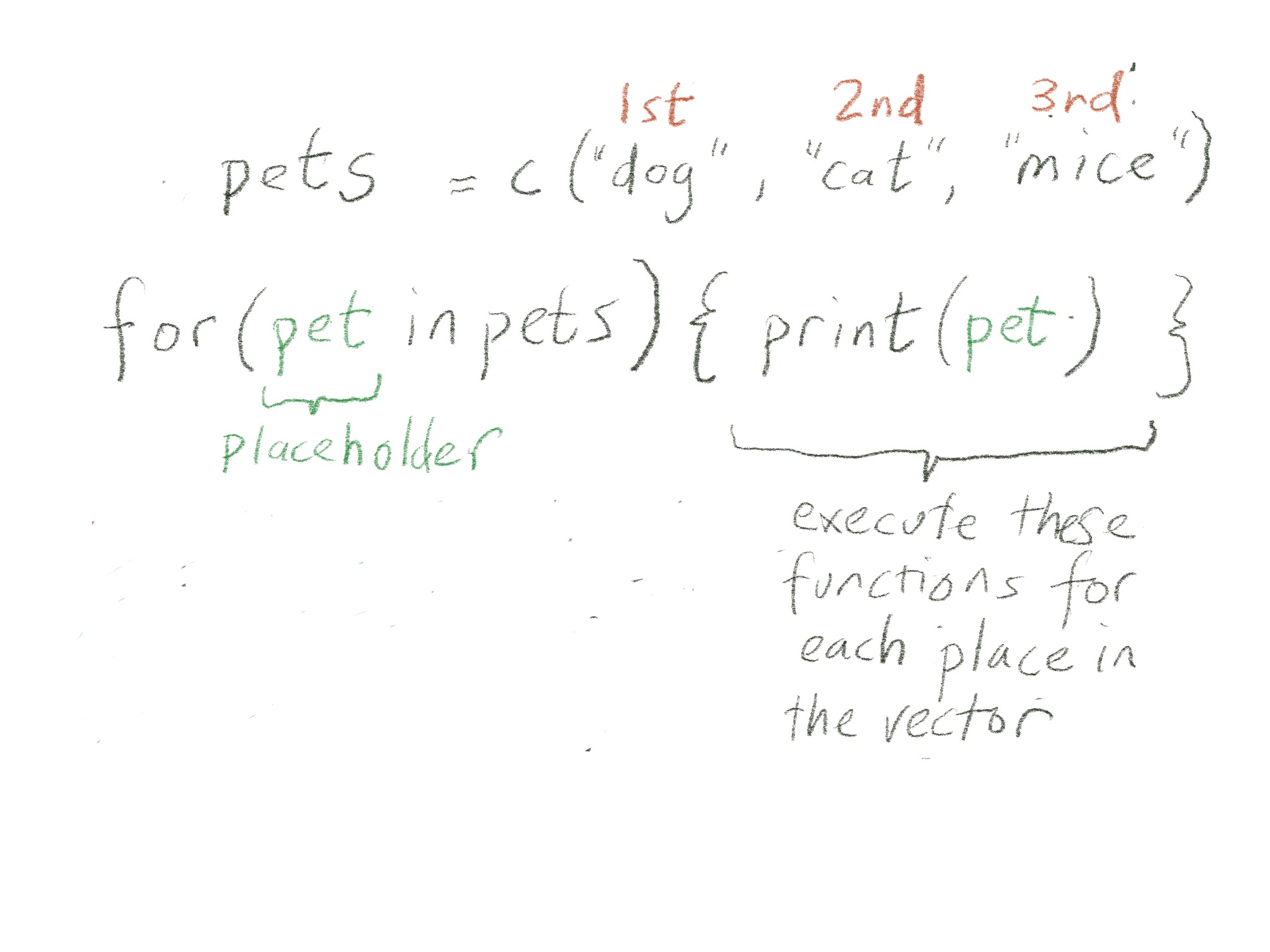
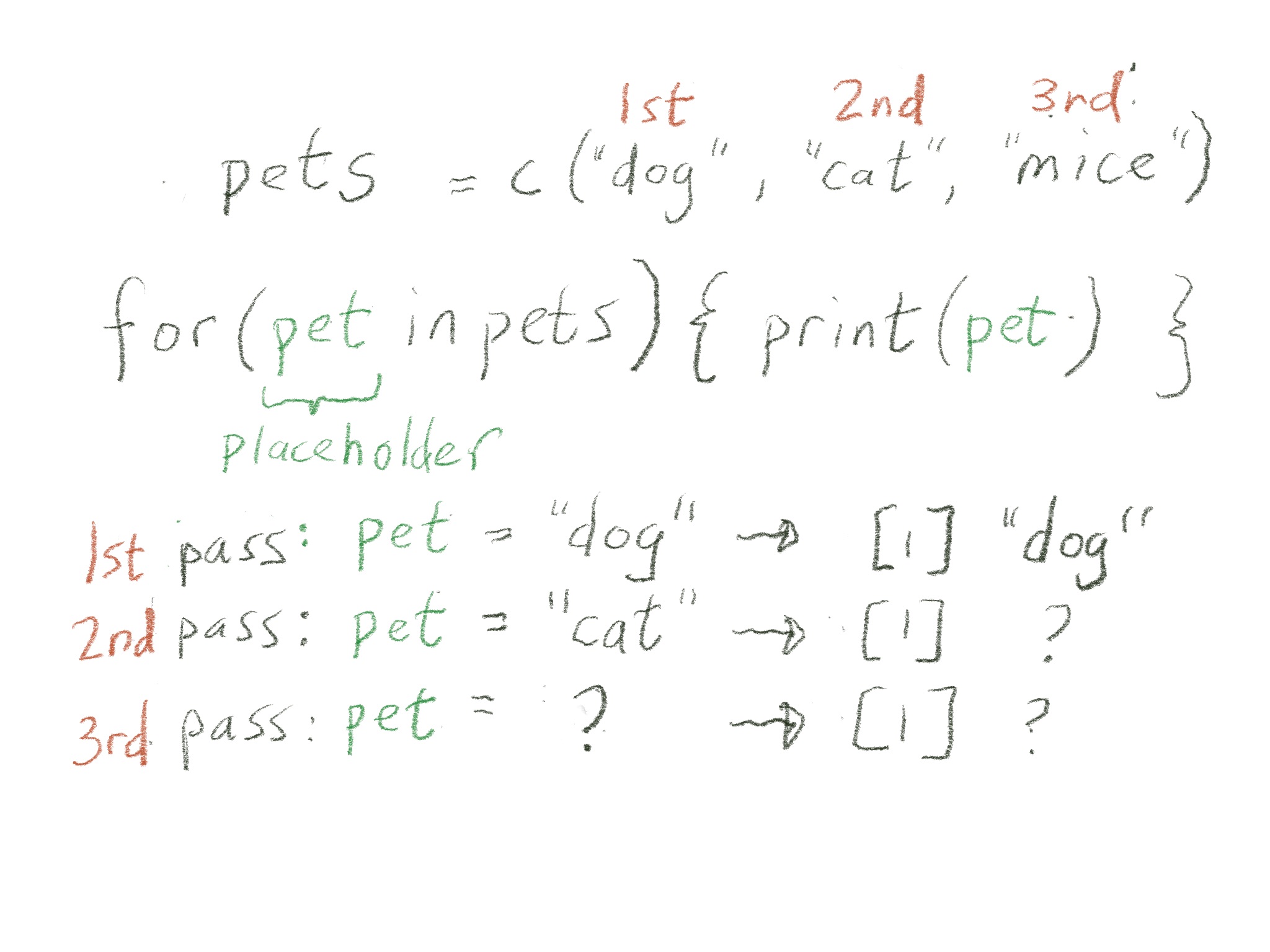
# for each index in the vector of pets, do the thing inside {}
pets <- c("dog", "cat", "mice")
for(index in pets) {
print(index)
}[1] "dog"
[1] "cat"
[1] "mice"
for() loop outputfor() loop do?[1] "meike's dog"
[1] "meike's cat"
[1] "meike's mice"
mypet is also saved as an object outside of the loop (into the global environment):for() loop creates?
for() loop creates as a vector# make an empty vector (initialize)
all_my_pets <- c()
for(pet in pets){
mypet <- paste("meike's", pet)
# add the new variable mypet to the end of the vector all_my_pets
all_my_pets <- c(all_my_pets, mypet)
}
all_my_pets[1] "meike's dog" "meike's cat" "meike's mice"
What happens when you run the for() loop multiple times without initializing all_my_pets?
We know all_my_pets is a vector.
for() loop calculates the number of gallons (ng) used by each car.cars_mpg <- c(20, 30, 44.2, 10)
cars_miles <- c(10, 1, 50, 10)
# modify the for loop to save output as a vector:
for(index in seq_along(cars_mpg)) {
ng <- cars_miles[index] / cars_mpg[index]
print(ng)
}[1] 0.5
[1] 0.03333333
[1] 1.131222
[1] 1
How many total gallons of gas did the cars use?
for() loops with listsWe can also iterate for() loops over lists.
[1] "dog" "cat" "mice"
[1] "DOG"
[1] "CAT"
[1] "MICE"
[1] 1
[1] "Morris" "Julia"
[1] 2
[1] "Spiny"
[1] 3
[1] "Rover" "Spot" "Kitty"
[1] 4
[1] 10 7
for(index in 1:length(my_list)) {
myelement <- my_list[[index]]
gg <- glue("The length of element {index} is: {length(myelement)}")
print(gg)
}The length of element 1 is: 2
The length of element 2 is: 1
The length of element 3 is: 3
The length of element 4 is: 2
purrr: no need for for loops 🥳
purrrfor() loops can indeed be useful, but they have their pros and cons
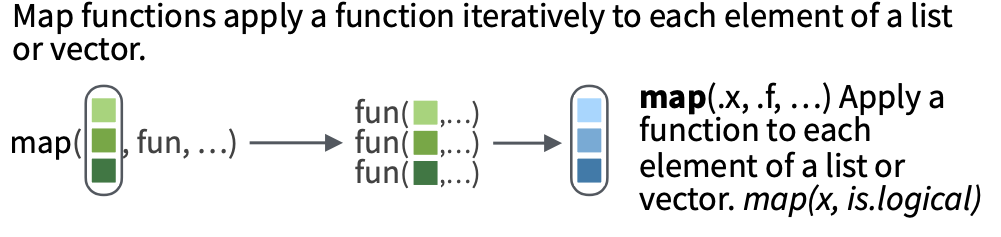
purrr::map()Enter the purrr package and map().
purrr::map() lets us apply a function to each element of a list.map() statement is:
map(.x = LIST_OBJECT, .f = FUNCTION_TO_APPLY)
for loop way is similar to the for loop where we printed the first element of the list on a previous slide:# create my list
my_list <- list(cat_names = c("Morris", "Julia"),
hedgehog_names = "Spiny",
dog_names = c("Rover", "Spot", "Kitty"),
cat_ages = c(10,7))
# apply get_first_element to each element of my_list and save the output:
# create empty list
list_output <- list()
# for loop along the length of my list (in this case, 4)
for(index in 1:length(my_list)) {
# print out the index just so we can see what index is
print(index)
# in the index'th slot, put in the first element of this list
list_output[[index]] <- get_first_element(my_list[[index]])
}[1] 1
[1] 2
[1] 3
[1] 4
[[1]]
[1] "Morris"
[[2]]
[1] "Spiny"
[[3]]
[1] "Rover"
[[4]]
[1] 10
purrr::map() gives us a much simpler way!for loop was doing,
# apply the function directly to each list element one by one
list_output_by_hand <-
list(
get_first_element(my_list[[1]]),
get_first_element(my_list[[2]]),
get_first_element(my_list[[3]]),
get_first_element(my_list[[4]])
)
list_output_by_hand[[1]]
[1] "Morris"
[[2]]
[1] "Spiny"
[[3]]
[1] "Rover"
[[4]]
[1] 10
purrr::map() does this automatically, without writing out the function 4 (or many more) times.map() usually takes two inputs:
map(.x = LIST_OBJECT, .f = FUNCTION_TO_APPLY)
map() instead of using a for loop.$cat_names
[1] "Morris"
$hedgehog_names
[1] "Spiny"
$dog_names
[1] "Rover"
$cat_ages
[1] 10
We have the same output as above using a for loop,
Note that we don’t call get_first_element() with the parentheses - (similar to how we use functions by name in across() and/or summarize())
We can also leave out the argument names for map() if we like:
By default, map() returns the results of your functions to a list.
purrr::map() will work on lists or vectors or data frames.
summarize() and mutate(), for example), andmap() to return the length of each of the elements in my_list.
() after the function name.mean, you might need to specify an argument for the function, such as na.omit=TRUE.my_list2 <- list(vec1 = c(10, 133, 1, NA),
vec2 = c(11, 12, NA, 4),
vec3 = c(1, 5, NA, 4, 100, 22)
)
# what happens without na.omit=TRUE?
map(.x = my_list2, .f = mean)$vec1
[1] NA
$vec2
[1] NA
$vec3
[1] NA
We can also use the pipe with map():
$cat_names
[1] "Morris"
$hedgehog_names
[1] "Spiny"
$dog_names
[1] "Rover"
$cat_ages
[1] 10
Meike’s favorite map() example:
# can be done with is.character as well
# penguins doesn't have character variables
penguins %>% select(where(is.factor)) %>%
map(tabyl)$species
.x[[i]] n percent
Adelie 152 0.4418605
Chinstrap 68 0.1976744
Gentoo 124 0.3604651
$island
.x[[i]] n percent
Biscoe 168 0.4883721
Dream 124 0.3604651
Torgersen 52 0.1511628
$sex
.x[[i]] n percent valid_percent
female 165 0.47965116 0.4954955
male 168 0.48837209 0.5045045
<NA> 11 0.03197674 NA
purrr iterationLearn to purrr from Rebecca Barter’s blog. This is a nice non-technical introduction to purrr and the various map variants.
Lessons in the purrr tutorial by Jenny Bryan.
The purrr cheatsheet to learn more about the purrr package.
From R for Data Science first edition (section 21.4):
The goal of using purrr functions instead of for loops is to allow you to break common list manipulation challenges into independent pieces:
This structure makes it easier to solve new problems. It also makes it easier to understand your solutions to old problems when you re-read your old code.
purrr::map() with data framespurrr::map() on a variety of simple lists.data.frames and use map() and friends of map() to do something to each data frame in the list.map() examplesWe’re going to explore two examples of using map().
map() to apply that function to a list of data frames.data.frame, and split it into smaller data.frames in a list.map() to apply that function to each of the smaller data.frames in our listdata.frametidy the outputmy_ttest <- function(mydata) {
t.test(age_at_diagnosis ~ vital_status,
data = mydata) %>%
tidy()
}
# apply my_ttest to one dataset:
my_ttest(lusc_data)# A tibble: 1 × 10
estimate estimate1 estimate2 statistic p.value parameter conf.low conf.high
<dbl> <dbl> <dbl> <dbl> <dbl> <dbl> <dbl> <dbl>
1 -736. 24431. 25166. -2.60 0.00948 467. -1290. -181.
# ℹ 2 more variables: method <chr>, alternative <chr>
map() to apply the t-test function we created to each dataset in the list:# Apply function to each element of list.
# Note the input/argument needs to be a data frame with the specified columns
tmpout <- map(.x = my_data_list,
.f = my_ttest)
tmpout$LUSC
# A tibble: 1 × 10
estimate estimate1 estimate2 statistic p.value parameter conf.low conf.high
<dbl> <dbl> <dbl> <dbl> <dbl> <dbl> <dbl> <dbl>
1 -736. 24431. 25166. -2.60 0.00948 467. -1290. -181.
# ℹ 2 more variables: method <chr>, alternative <chr>
$READ
# A tibble: 1 × 10
estimate estimate1 estimate2 statistic p.value parameter conf.low conf.high
<dbl> <dbl> <dbl> <dbl> <dbl> <dbl> <dbl> <dbl>
1 -2476. 23312. 25788. -3.02 0.00445 39.7 -4135. -816.
# ℹ 2 more variables: method <chr>, alternative <chr>
$PRAD
# A tibble: 1 × 10
estimate estimate1 estimate2 statistic p.value parameter conf.low conf.high
<dbl> <dbl> <dbl> <dbl> <dbl> <dbl> <dbl> <dbl>
1 -405. 22472. 22877. -0.422 0.683 9.25 -2571. 1760.
# ℹ 2 more variables: method <chr>, alternative <chr>
$MESO
# A tibble: 1 × 10
estimate estimate1 estimate2 statistic p.value parameter conf.low conf.high
<dbl> <dbl> <dbl> <dbl> <dbl> <dbl> <dbl> <dbl>
1 -949. 22381. 23330. -0.842 0.412 15.9 -3341. 1442.
# ℹ 2 more variables: method <chr>, alternative <chr>
my_ttest above that fits a linear regression instead of a t-test with the same outcome/group variables, and apply to the list of data sets using map().map output typesmap() takes a list as an input and returns a list (named, if input is named).tmpout is the output from applying map() to our custom function my_ttest.list_rbind() to convert a list of data frames/tibbles to one tibble.names_to to create a column that contains the original names of the list elements so that we can tell which dataset the output came from.| data_source | estimate | estimate1 | estimate2 | statistic | p.value | parameter | conf.low | conf.high | method | alternative |
|---|---|---|---|---|---|---|---|---|---|---|
| LUSC | -735.5727 | 24430.75 | 25166.33 | -2.6049935 | 0.009480368 | 467.490634 | -1290.445 | -180.7006 | Welch Two Sample t-test | two.sided |
| READ | -2475.6902 | 23312.27 | 25787.96 | -3.0162774 | 0.004447789 | 39.721988 | -4134.904 | -816.4769 | Welch Two Sample t-test | two.sided |
| PRAD | -405.3397 | 22471.96 | 22877.30 | -0.4216618 | 0.682899217 | 9.253084 | -2570.898 | 1760.2187 | Welch Two Sample t-test | two.sided |
| MESO | -949.3981 | 22380.62 | 23330.01 | -0.8418847 | 0.412320094 | 15.921484 | -3340.986 | 1442.1896 | Welch Two Sample t-test | two.sided |
map_df() is a superseded purrr function that returns a data frame.# A tibble: 4 × 10
estimate estimate1 estimate2 statistic p.value parameter conf.low conf.high
<dbl> <dbl> <dbl> <dbl> <dbl> <dbl> <dbl> <dbl>
1 -736. 24431. 25166. -2.60 0.00948 467. -1290. -181.
2 -2476. 23312. 25788. -3.02 0.00445 39.7 -4135. -816.
3 -405. 22472. 22877. -0.422 0.683 9.25 -2571. 1760.
4 -949. 22381. 23330. -0.842 0.412 15.9 -3341. 1442.
# ℹ 2 more variables: method <chr>, alternative <chr>
map() together with list_rbind() instead.Note that there are type-specific maps that return a vector of numeric values or whatever type you expect, such as
map_int() - returns an integer vector
map should return an integermap_chr() - function should return a character vector
map_dbl() - function should return a double (decimal) vector
doubleThe main difference between these is that they are strict: if you function doesn’t return the desired data type, it will return an error.
Recall my_list:
$cat_names
[1] "Morris" "Julia"
$hedgehog_names
[1] "Spiny"
$dog_names
[1] "Rover" "Spot" "Kitty"
$cat_ages
[1] 10 7
Examples that return a character vector.
cat_names hedgehog_names dog_names
"Morris, Julia" "Spiny" "Rover, Spot, Kitty"
cat_ages
"10, 7"
1a. Write a function that returns the first column name of a data frame.
1b. Apply this function to each of the data frames in my_data_list using a type-specific map from above.
2a. Write a function that takes a data frame as an argument and returns the first 3 rows. (Hint: remember slice()? or head() or slice_head()?).
2b. Apply this function using map() to my_data_list and return a stacked (row-wise) data frame of the first 3 rows of each element of the list, making sure to save the name of the data frame in a column called source.
map() on split or nested data framessmoke_complete.map() within mutate() to the sub data sets. - We will go further into this useful method in the next class.# Note the data are in the part8/data folder!
smoke_complete <- read_csv(here::here("part8", "data", "clinical.csv"))
glimpse(smoke_complete)Rows: 6,832
Columns: 20
$ primary_diagnosis <chr> "C34.1", "C34.1", "C34.3", "C34.1", "C34.3…
$ tumor_stage <chr> "stage ia", "stage ib", "stage ib", "stage…
$ age_at_diagnosis <dbl> 24477, 26615, 28171, 27154, 29827, 23370, …
$ vital_status <chr> "dead", "dead", "dead", "alive", "dead", "…
$ morphology <chr> "8070/3", "8070/3", "8070/3", "8083/3", "8…
$ days_to_death <dbl> 371, 136, 2304, NA, 146, NA, 345, 716, 280…
$ state <chr> "live", "live", "live", "live", "live", "l…
$ tissue_or_organ_of_origin <chr> "C34.1", "C34.1", "C34.3", "C34.1", "C34.3…
$ days_to_birth <dbl> -24477, -26615, -28171, -27154, -29827, -2…
$ site_of_resection_or_biopsy <chr> "C34.1", "C34.1", "C34.3", "C34.1", "C34.3…
$ days_to_last_follow_up <dbl> NA, NA, 2099, 3747, NA, 3576, NA, NA, 1810…
$ cigarettes_per_day <dbl> 10.9589041, 2.1917808, 1.6438356, 1.095890…
$ years_smoked <dbl> NA, NA, NA, NA, NA, NA, NA, NA, NA, NA, 26…
$ gender <chr> "male", "male", "female", "male", "male", …
$ year_of_birth <dbl> 1936, 1931, 1927, 1930, 1923, 1942, 1953, …
$ race <chr> "white", "asian", "white", "white", "not r…
$ ethnicity <chr> "not hispanic or latino", "not hispanic or…
$ year_of_death <dbl> 2004, 2003, NA, NA, 2004, NA, 2005, 2006, …
$ bcr_patient_barcode <chr> "TCGA-18-3406", "TCGA-18-3407", "TCGA-18-3…
$ disease <chr> "LUSC", "LUSC", "LUSC", "LUSC", "LUSC", "L…
my_ttest <- function(mydata) {
mydata <- mydata %>% mutate(yrs_diagnosis = age_at_diagnosis/365.25)
t.test(yrs_diagnosis ~ vital_status, data = mydata) %>% tidy()
}
# check function works on one dataset:
smoke_complete %>%
filter(vital_status %in% c("alive", "dead")) %>%
my_ttest()# A tibble: 1 × 10
estimate estimate1 estimate2 statistic p.value parameter conf.low conf.high
<dbl> <dbl> <dbl> <dbl> <dbl> <dbl> <dbl> <dbl>
1 -3.32 60.0 63.3 -9.21 5.08e-20 4302. -4.03 -2.61
# ℹ 2 more variables: method <chr>, alternative <chr>
group_nest()grouped_smoke <- smoke_complete %>%
filter(vital_status %in% c("alive", "dead")) %>%
group_nest(disease)
grouped_smoke# A tibble: 15 × 2
disease data
<chr> <list<tibble[,19]>>
1 BLCA [412 × 19]
2 BRCA [1,097 × 19]
3 CESC [307 × 19]
4 COAD [459 × 19]
5 GBM [594 × 19]
6 LGG [515 × 19]
7 LUSC [1,008 × 19]
8 MESO [87 × 19]
9 PRAD [500 × 19]
10 READ [170 × 19]
11 SKCM [470 × 19]
12 STAD [443 × 19]
13 THYM [124 × 19]
14 UCEC [548 × 19]
15 UCS [57 × 19]
map() via a mutate().# A tibble: 15 × 3
disease data t_out
<chr> <list<tibble[,19]>> <list>
1 BLCA [412 × 19] <tibble [1 × 10]>
2 BRCA [1,097 × 19] <tibble [1 × 10]>
3 CESC [307 × 19] <tibble [1 × 10]>
4 COAD [459 × 19] <tibble [1 × 10]>
5 GBM [594 × 19] <tibble [1 × 10]>
6 LGG [515 × 19] <tibble [1 × 10]>
7 LUSC [1,008 × 19] <tibble [1 × 10]>
8 MESO [87 × 19] <tibble [1 × 10]>
9 PRAD [500 × 19] <tibble [1 × 10]>
10 READ [170 × 19] <tibble [1 × 10]>
11 SKCM [470 × 19] <tibble [1 × 10]>
12 STAD [443 × 19] <tibble [1 × 10]>
13 THYM [124 × 19] <tibble [1 × 10]>
14 UCEC [548 × 19] <tibble [1 × 10]>
15 UCS [57 × 19] <tibble [1 × 10]>
unnest() the grouped t-test output so that the t-test output for all of the diseased is “flat” in one tibble.cols argument.grouped_smoke %>%
select(-data) %>%
unnest(cols = c(t_out)) %>%
mutate(p.value = scales::label_pvalue()(p.value)) %>%
gt()| disease | estimate | estimate1 | estimate2 | statistic | p.value | parameter | conf.low | conf.high | method | alternative |
|---|---|---|---|---|---|---|---|---|---|---|
| BLCA | -4.18141011 | 66.69616 | 70.87757 | -4.13296252 | <0.001 | 407.723029 | -6.170253 | -2.1925672 | Welch Two Sample t-test | two.sided |
| BRCA | -2.93049758 | 58.67507 | 61.60557 | -2.28291008 | 0.024 | 189.107325 | -5.462645 | -0.3983506 | Welch Two Sample t-test | two.sided |
| CESC | -4.26809399 | 47.68270 | 51.95080 | -2.12227460 | 0.036 | 103.322202 | -8.256477 | -0.2797109 | Welch Two Sample t-test | two.sided |
| COAD | -3.84771067 | 66.53747 | 70.38518 | -2.56572823 | 0.011 | 155.986184 | -6.809965 | -0.8854561 | Welch Two Sample t-test | two.sided |
| GBM | -3.61490053 | 55.31546 | 58.93036 | -2.14203361 | 0.034 | 136.010467 | -6.952234 | -0.2775670 | Welch Two Sample t-test | two.sided |
| LGG | -6.60418948 | 41.81057 | 48.41476 | -4.63697902 | <0.001 | 192.951960 | -9.413275 | -3.7951035 | Welch Two Sample t-test | two.sided |
| LUSC | -2.01388823 | 66.88776 | 68.90165 | -3.68786423 | <0.001 | 937.087892 | -3.085580 | -0.9421966 | Welch Two Sample t-test | two.sided |
| MESO | -2.59931041 | 61.27479 | 63.87410 | -0.84188467 | 0.412 | 15.921484 | -9.147121 | 3.9485000 | Welch Two Sample t-test | two.sided |
| PRAD | -1.10975952 | 61.52487 | 62.63463 | -0.42166179 | 0.683 | 9.253084 | -7.038735 | 4.8192161 | Welch Two Sample t-test | two.sided |
| READ | -6.77807046 | 63.82552 | 70.60359 | -3.01627737 | 0.004 | 39.721988 | -11.320749 | -2.2353919 | Welch Two Sample t-test | two.sided |
| SKCM | -0.08157551 | 58.69815 | 58.77973 | -0.05563643 | 0.956 | 456.011625 | -2.962971 | 2.7998196 | Welch Two Sample t-test | two.sided |
| STAD | -1.56574754 | 65.60611 | 67.17186 | -1.51171531 | 0.131 | 384.531147 | -3.602175 | 0.4706797 | Welch Two Sample t-test | two.sided |
| THYM | -7.48772570 | 58.12700 | 65.61472 | -1.91421727 | 0.085 | 9.803597 | -16.227125 | 1.2516736 | Welch Two Sample t-test | two.sided |
| UCEC | -4.32697548 | 63.68563 | 68.01261 | -3.30806084 | 0.001 | 125.133543 | -6.915662 | -1.7382891 | Welch Two Sample t-test | two.sided |
| UCS | -4.76002738 | 67.40041 | 72.16044 | -2.12320590 | 0.038 | 54.695884 | -9.253468 | -0.2665864 | Welch Two Sample t-test | two.sided |
Please fill out the post-class survey.
Your responses are anonymous in that I separate your names from the survey answers before compiling/reading.
You may want to review previous years’ feedback here.