
10: More purrring

BSTA 526: R Programming for Health Data Science

Meike Niederhausen, PhD & Jessica Minnier, PhD

OHSU-PSU School of Public Health

2026-03-05

1 Welcome to R Programming: Part 10!

Today we will learn more about iterating in R with purrr.


Before you get started:

Remember to save this notebook under a new name, such as part_10_b526_YOURNAME.qmd.


  • Load the packages in the setup code chunk

1.1 Learning Objectives

  • Use map() functions from the purrr package to iterate functions
  • Nest datasets into list-columns, and iterate statistical modeling and/or visualization functions over those elements
  • Use map2() from the purrr package to iterate functions across two inputs
  • Learn how to iterate regression modeling across different model variables

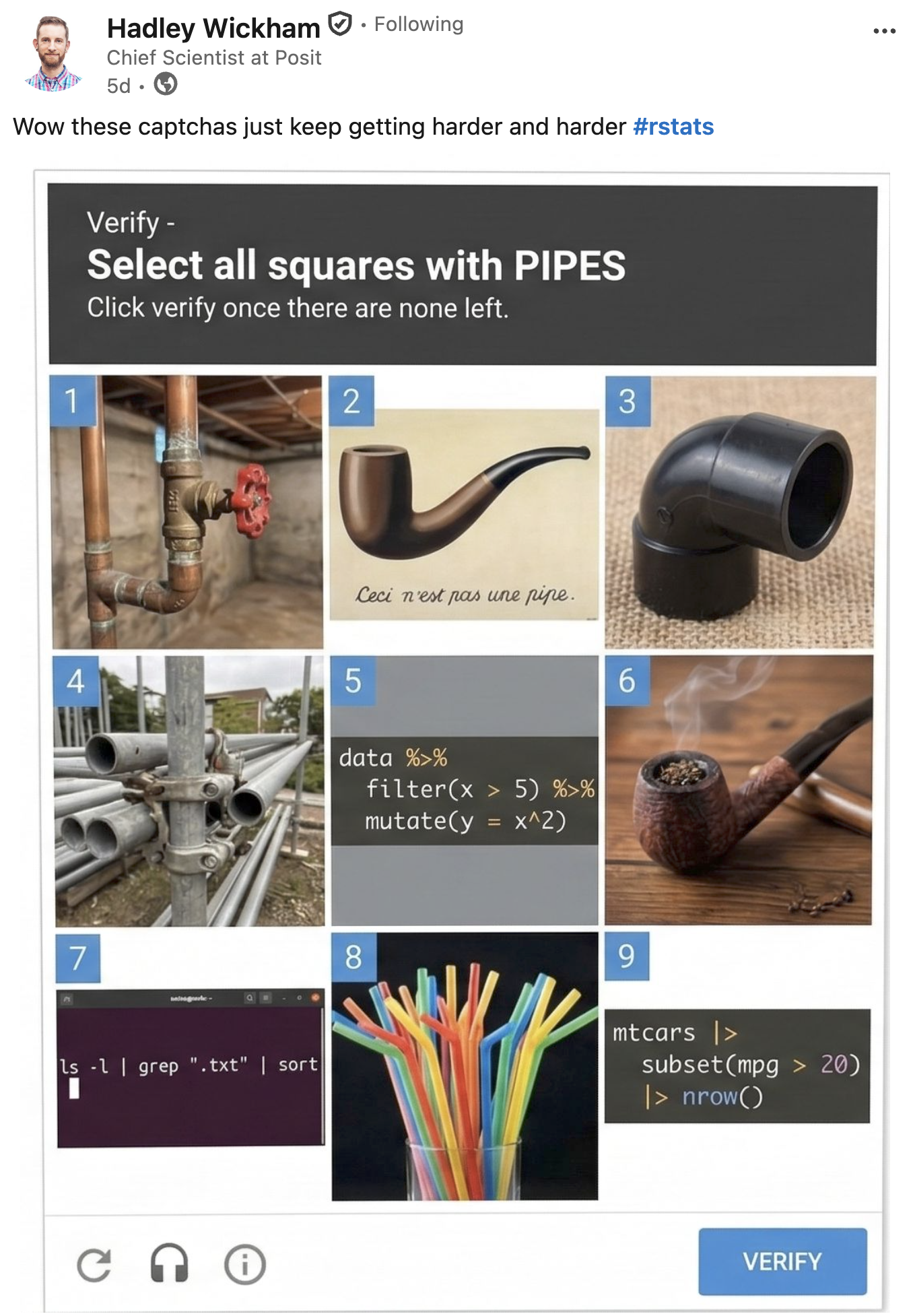
1.2 Select all squares with pipes before moving on…

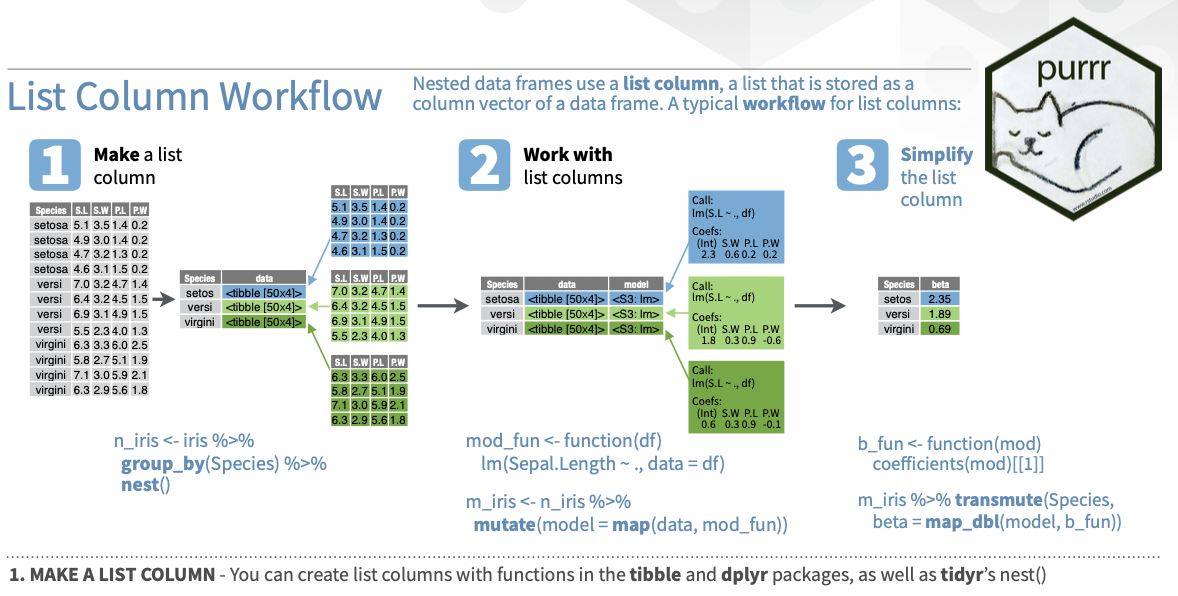
2 Last time: iteration with purrr

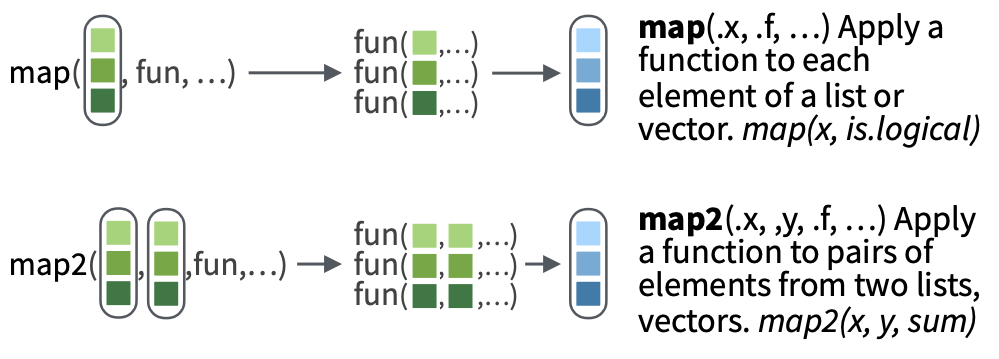
Please look at the purrr cheatsheet.

2.1 Why purrr?

From the first edition of R for Data Science:

The goal of using purrr functions instead of for loops is to allow you to break common list manipulation challenges into independent pieces:

  • How can you solve the problem for a single element of the list? Once you’ve solved that problem, purrr takes care of generalising your solution to every element in the list.
  • If you’re solving a complex problem, how can you break it down into bite-sized pieces that allow you to advance one small step towards a solution? With purrr, you get lots of small pieces that you can compose together with the pipe.

This structure makes it easier to solve new problems. It also makes it easier to understand your solutions to old problems when you re-read your old code.

2.2 purrr::map() applied to lists

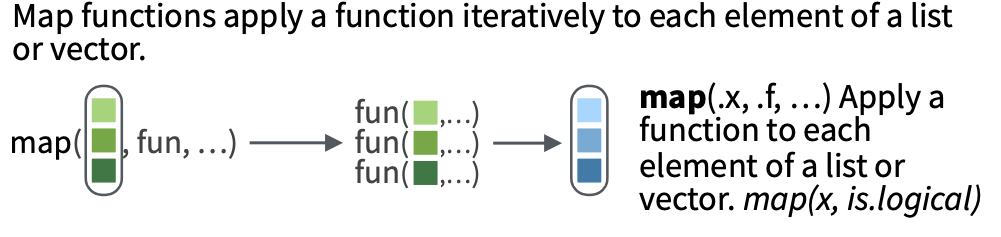
Remember purrr::map() from part 8:

  • purrr::map() lets us apply a function to each element of a list (or data frame).
  • It will always return a list with the number of elements that is the same as the list we input it with.
  • Each slot of the returned list will contain the output of the functions applied to each element of the input list.

The way to read a map() statement is:

map(.x = LIST_OBJECT, .f = FUNCTION_TO_APPLY)

3 purrr::map() on nested data frames

  • Last time we learned how to apply map() on a list of data frames (Part 8, Section 5)
  • Typically we have just one data frame though, and we want to perform the same operation on subsets of that data frame.

3.1 Example

Example: on your homework the penguins data was grouped by species and group_split() was used to create a list of data frames:

# split one data frame into three data frames defined by the species (grouping variable)
# .keep = TRUE keeps the species (grouping) column in the data sets
penguins_by_species <- penguins  %>% 
  group_by(species) %>% 
  group_split(.keep = TRUE)

penguins_by_species  # lists are numbered
<list_of<
  tbl_df<
    species          : factor<b22a0>
    island           : factor<ccf33>
    bill_length_mm   : double
    bill_depth_mm    : double
    flipper_length_mm: integer
    body_mass_g      : integer
    sex              : factor<8f119>
    year             : integer
  >
>[3]>
[[1]]
# A tibble: 152 × 8
   species island    bill_length_mm bill_depth_mm flipper_length_mm body_mass_g
   <fct>   <fct>              <dbl>         <dbl>             <int>       <int>
 1 Adelie  Torgersen           39.1          18.7               181        3750
 2 Adelie  Torgersen           39.5          17.4               186        3800
 3 Adelie  Torgersen           40.3          18                 195        3250
 4 Adelie  Torgersen           NA            NA                  NA          NA
 5 Adelie  Torgersen           36.7          19.3               193        3450
 6 Adelie  Torgersen           39.3          20.6               190        3650
 7 Adelie  Torgersen           38.9          17.8               181        3625
 8 Adelie  Torgersen           39.2          19.6               195        4675
 9 Adelie  Torgersen           34.1          18.1               193        3475
10 Adelie  Torgersen           42            20.2               190        4250
# ℹ 142 more rows
# ℹ 2 more variables: sex <fct>, year <int>

[[2]]
# A tibble: 68 × 8
   species   island bill_length_mm bill_depth_mm flipper_length_mm body_mass_g
   <fct>     <fct>           <dbl>         <dbl>             <int>       <int>
 1 Chinstrap Dream            46.5          17.9               192        3500
 2 Chinstrap Dream            50            19.5               196        3900
 3 Chinstrap Dream            51.3          19.2               193        3650
 4 Chinstrap Dream            45.4          18.7               188        3525
 5 Chinstrap Dream            52.7          19.8               197        3725
 6 Chinstrap Dream            45.2          17.8               198        3950
 7 Chinstrap Dream            46.1          18.2               178        3250
 8 Chinstrap Dream            51.3          18.2               197        3750
 9 Chinstrap Dream            46            18.9               195        4150
10 Chinstrap Dream            51.3          19.9               198        3700
# ℹ 58 more rows
# ℹ 2 more variables: sex <fct>, year <int>

[[3]]
# A tibble: 124 × 8
   species island bill_length_mm bill_depth_mm flipper_length_mm body_mass_g
   <fct>   <fct>           <dbl>         <dbl>             <int>       <int>
 1 Gentoo  Biscoe           46.1          13.2               211        4500
 2 Gentoo  Biscoe           50            16.3               230        5700
 3 Gentoo  Biscoe           48.7          14.1               210        4450
 4 Gentoo  Biscoe           50            15.2               218        5700
 5 Gentoo  Biscoe           47.6          14.5               215        5400
 6 Gentoo  Biscoe           46.5          13.5               210        4550
 7 Gentoo  Biscoe           45.4          14.6               211        4800
 8 Gentoo  Biscoe           46.7          15.3               219        5200
 9 Gentoo  Biscoe           43.3          13.4               209        4400
10 Gentoo  Biscoe           46.8          15.4               215        5150
# ℹ 114 more rows
# ℹ 2 more variables: sex <fct>, year <int>
penguin_names <- levels(penguins$species)

names(penguins_by_species) <- penguin_names

penguins_by_species # lists are now named with species names
<list_of<
  tbl_df<
    species          : factor<b22a0>
    island           : factor<ccf33>
    bill_length_mm   : double
    bill_depth_mm    : double
    flipper_length_mm: integer
    body_mass_g      : integer
    sex              : factor<8f119>
    year             : integer
  >
>[3]>
$Adelie
# A tibble: 152 × 8
   species island    bill_length_mm bill_depth_mm flipper_length_mm body_mass_g
   <fct>   <fct>              <dbl>         <dbl>             <int>       <int>
 1 Adelie  Torgersen           39.1          18.7               181        3750
 2 Adelie  Torgersen           39.5          17.4               186        3800
 3 Adelie  Torgersen           40.3          18                 195        3250
 4 Adelie  Torgersen           NA            NA                  NA          NA
 5 Adelie  Torgersen           36.7          19.3               193        3450
 6 Adelie  Torgersen           39.3          20.6               190        3650
 7 Adelie  Torgersen           38.9          17.8               181        3625
 8 Adelie  Torgersen           39.2          19.6               195        4675
 9 Adelie  Torgersen           34.1          18.1               193        3475
10 Adelie  Torgersen           42            20.2               190        4250
# ℹ 142 more rows
# ℹ 2 more variables: sex <fct>, year <int>

$Chinstrap
# A tibble: 68 × 8
   species   island bill_length_mm bill_depth_mm flipper_length_mm body_mass_g
   <fct>     <fct>           <dbl>         <dbl>             <int>       <int>
 1 Chinstrap Dream            46.5          17.9               192        3500
 2 Chinstrap Dream            50            19.5               196        3900
 3 Chinstrap Dream            51.3          19.2               193        3650
 4 Chinstrap Dream            45.4          18.7               188        3525
 5 Chinstrap Dream            52.7          19.8               197        3725
 6 Chinstrap Dream            45.2          17.8               198        3950
 7 Chinstrap Dream            46.1          18.2               178        3250
 8 Chinstrap Dream            51.3          18.2               197        3750
 9 Chinstrap Dream            46            18.9               195        4150
10 Chinstrap Dream            51.3          19.9               198        3700
# ℹ 58 more rows
# ℹ 2 more variables: sex <fct>, year <int>

$Gentoo
# A tibble: 124 × 8
   species island bill_length_mm bill_depth_mm flipper_length_mm body_mass_g
   <fct>   <fct>           <dbl>         <dbl>             <int>       <int>
 1 Gentoo  Biscoe           46.1          13.2               211        4500
 2 Gentoo  Biscoe           50            16.3               230        5700
 3 Gentoo  Biscoe           48.7          14.1               210        4450
 4 Gentoo  Biscoe           50            15.2               218        5700
 5 Gentoo  Biscoe           47.6          14.5               215        5400
 6 Gentoo  Biscoe           46.5          13.5               210        4550
 7 Gentoo  Biscoe           45.4          14.6               211        4800
 8 Gentoo  Biscoe           46.7          15.3               219        5200
 9 Gentoo  Biscoe           43.3          13.4               209        4400
10 Gentoo  Biscoe           46.8          15.4               215        5150
# ℹ 114 more rows
# ℹ 2 more variables: sex <fct>, year <int>
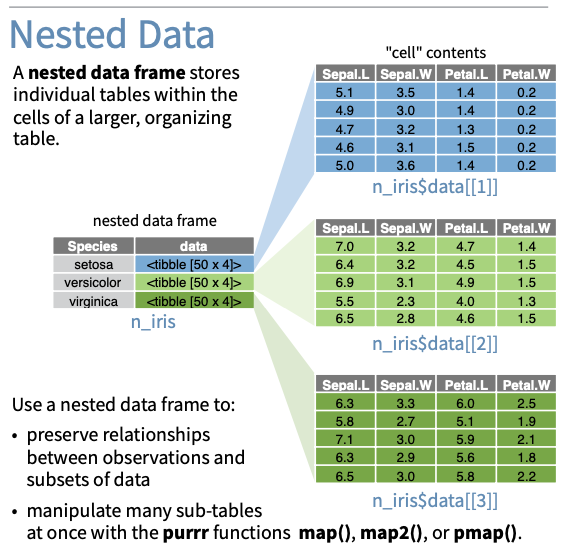
  • Today we’re going to do this a different and more common way using group_nest().
  • To use this method we must understand what it means to “nest” and what list-columns are.

3.2 List-columns

  • A list-column is a column of a data frame that contains lists.
  • We are familiar with vector-columns that contain a vector of character or numeric (usually) data.
  • This is the same idea, except each element of the column is a list.

Example:

mydf <- tibble(
  patientid = c(1123, 2534, 13253),
  date = c("2021-01","2022-02","2022-03"),
  listcol = list(a = c("a","b"),
                 b = 1:3,
                 c = "c"))
mydf
# A tibble: 3 × 3
  patientid date    listcol     
      <dbl> <chr>   <named list>
1      1123 2021-01 <chr [2]>   
2      2534 2022-02 <int [3]>   
3     13253 2022-03 <chr [1]>   
  • You can see above that the listcol column is of type list, and we see abbreviated information about it.
  • We can see a little bit more with glimpse:
glimpse(mydf)
Rows: 3
Columns: 3
$ patientid <dbl> 1123, 2534, 13253
$ date      <chr> "2021-01", "2022-02", "2022-03"
$ listcol   <named list> <"a", "b">, <1, 2, 3>, "c"

3.3 Nesting

So what does this have to do with mapping data frames? Below we are nesting our data frame by the grouping variable, species:

# cute name, huh?
penguins_nested <- penguins %>%
  mutate(
    bill_length_long = case_when(
      bill_length_mm >= 44 ~ "Yes",  # median is 44.45, mean is 43.92 
      bill_length_mm < 44 ~ "No"),
    bill_length_long = factor(bill_length_long)
    ) %>% 
  # use species column to define the new rows
  group_by(species) %>% 
  nest()

penguins_nested
# A tibble: 3 × 2
# Groups:   species [3]
  species   data              
  <fct>     <list>            
1 Adelie    <tibble [152 × 8]>
2 Gentoo    <tibble [124 × 8]>
3 Chinstrap <tibble [68 × 8]> 
glimpse(penguins_nested)
Rows: 3
Columns: 2
Groups: species [3]
$ species <fct> Adelie, Gentoo, Chinstrap
$ data    <list> [<tbl_df[152 x 8]>], [<tbl_df[124 x 8]>], [<tbl_df[68 x 8]>]

Note: There is also the dplyr function group_nest(), which was used at the end of part 8 and does the same thing as group_by() followed by nest(). This is in lifecycle “experimental” though and may be deprecated in the future.

3.4 Look at the nested datasets

We can pull out our data column with the $ and see it is a list:

penguins_nested$data
[[1]]
# A tibble: 152 × 8
   island bill_length_mm bill_depth_mm flipper_length_mm body_mass_g sex    year
   <fct>           <dbl>         <dbl>             <int>       <int> <fct> <int>
 1 Torge…           39.1          18.7               181        3750 male   2007
 2 Torge…           39.5          17.4               186        3800 fema…  2007
 3 Torge…           40.3          18                 195        3250 fema…  2007
 4 Torge…           NA            NA                  NA          NA <NA>   2007
 5 Torge…           36.7          19.3               193        3450 fema…  2007
 6 Torge…           39.3          20.6               190        3650 male   2007
 7 Torge…           38.9          17.8               181        3625 fema…  2007
 8 Torge…           39.2          19.6               195        4675 male   2007
 9 Torge…           34.1          18.1               193        3475 <NA>   2007
10 Torge…           42            20.2               190        4250 <NA>   2007
# ℹ 142 more rows
# ℹ 1 more variable: bill_length_long <fct>

[[2]]
# A tibble: 124 × 8
   island bill_length_mm bill_depth_mm flipper_length_mm body_mass_g sex    year
   <fct>           <dbl>         <dbl>             <int>       <int> <fct> <int>
 1 Biscoe           46.1          13.2               211        4500 fema…  2007
 2 Biscoe           50            16.3               230        5700 male   2007
 3 Biscoe           48.7          14.1               210        4450 fema…  2007
 4 Biscoe           50            15.2               218        5700 male   2007
 5 Biscoe           47.6          14.5               215        5400 male   2007
 6 Biscoe           46.5          13.5               210        4550 fema…  2007
 7 Biscoe           45.4          14.6               211        4800 fema…  2007
 8 Biscoe           46.7          15.3               219        5200 male   2007
 9 Biscoe           43.3          13.4               209        4400 fema…  2007
10 Biscoe           46.8          15.4               215        5150 male   2007
# ℹ 114 more rows
# ℹ 1 more variable: bill_length_long <fct>

[[3]]
# A tibble: 68 × 8
   island bill_length_mm bill_depth_mm flipper_length_mm body_mass_g sex    year
   <fct>           <dbl>         <dbl>             <int>       <int> <fct> <int>
 1 Dream            46.5          17.9               192        3500 fema…  2007
 2 Dream            50            19.5               196        3900 male   2007
 3 Dream            51.3          19.2               193        3650 male   2007
 4 Dream            45.4          18.7               188        3525 fema…  2007
 5 Dream            52.7          19.8               197        3725 male   2007
 6 Dream            45.2          17.8               198        3950 fema…  2007
 7 Dream            46.1          18.2               178        3250 fema…  2007
 8 Dream            51.3          18.2               197        3750 male   2007
 9 Dream            46            18.9               195        4150 fema…  2007
10 Dream            51.3          19.9               198        3700 male   2007
# ℹ 58 more rows
# ℹ 1 more variable: bill_length_long <fct>
class(penguins_nested$data)
[1] "list"

Which means we can index it with the [[]] double brackets:

# The first "row" which is the first element of the list
penguins_nested$data[[1]]
# A tibble: 152 × 8
   island bill_length_mm bill_depth_mm flipper_length_mm body_mass_g sex    year
   <fct>           <dbl>         <dbl>             <int>       <int> <fct> <int>
 1 Torge…           39.1          18.7               181        3750 male   2007
 2 Torge…           39.5          17.4               186        3800 fema…  2007
 3 Torge…           40.3          18                 195        3250 fema…  2007
 4 Torge…           NA            NA                  NA          NA <NA>   2007
 5 Torge…           36.7          19.3               193        3450 fema…  2007
 6 Torge…           39.3          20.6               190        3650 male   2007
 7 Torge…           38.9          17.8               181        3625 fema…  2007
 8 Torge…           39.2          19.6               195        4675 male   2007
 9 Torge…           34.1          18.1               193        3475 <NA>   2007
10 Torge…           42            20.2               190        4250 <NA>   2007
# ℹ 142 more rows
# ℹ 1 more variable: bill_length_long <fct>

Note that species is no longer a column in these datasets!!!

4 mutate and map nested data

How do we apply functions to this nested data set?

  • We can use mutate() to mutate the list column along with map()!
  • We use mutate() because we are mutating a COLUMN (which happens to be a list column) in a data frame.

4.1 Example: dim()

Let’s see a simple example before running our model.

Remember how penguins_nested looks:

glimpse(penguins_nested)
Rows: 3
Columns: 2
Groups: species [3]
$ species <fct> Adelie, Gentoo, Chinstrap
$ data    <list> [<tbl_df[152 x 8]>], [<tbl_df[124 x 8]>], [<tbl_df[68 x 8]>]
  • The column that we want to mutate/map is called data.
  • We want to create a new column by applying a function to that list-column.
# Create a new column called dim_data (it will be a list-column)
# First argument of map is the name of the column with the list of data
# Second argument of map is the function name (without parens)

penguins_nested <- penguins_nested %>%
  # new column name = map(list-column-name, function-to-apply)
  mutate(dim_data = map(.x = data, .f = dim)) 

penguins_nested
# A tibble: 3 × 3
# Groups:   species [3]
  species   data               dim_data 
  <fct>     <list>             <list>   
1 Adelie    <tibble [152 × 8]> <int [2]>
2 Gentoo    <tibble [124 × 8]> <int [2]>
3 Chinstrap <tibble [68 × 8]>  <int [2]>
penguins_nested %>%
  glimpse()
Rows: 3
Columns: 3
Groups: species [3]
$ species  <fct> Adelie, Gentoo, Chinstrap
$ data     <list> [<tbl_df[152 x 8]>], [<tbl_df[124 x 8]>], [<tbl_df[68 x 8]>]
$ dim_data <list> <152, 8>, <124, 8>, <68, 8>
# a list of dimensions
penguins_nested$dim_data
[[1]]
[1] 152   8

[[2]]
[1] 124   8

[[3]]
[1] 68  8

4.2 Example: logistic regression with glm()

  • Suppose we want to look at the association between having a long bill length (bill_length_long) and the variable bill depth.
    • Since the outcome is a binary variable. we use a logistic regression model (covered in BSTA 513).
  • Note that we no longer have a column species in the data subsets in the list-column.
    • The species information remained in the species column of the penguins_nested tibble.
    • The list-column contains every column except species.
# function only takes data frame as an input
# runs glm
run_glm <- function(df) {
  # fit a logistic regression model with these data
  # glm(bill_length_long ~ sex, data = df)
  glm(bill_length_long ~ bill_depth_mm, 
      family = "binomial",
      data = df)
}

Test function:

run_glm(df = penguins_nested$data[[1]])

Call:  glm(formula = bill_length_long ~ bill_depth_mm, family = "binomial", 
    data = df)

Coefficients:
  (Intercept)  bill_depth_mm  
     -20.3177         0.8927  

Degrees of Freedom: 150 Total (i.e. Null);  149 Residual
  (1 observation deleted due to missingness)
Null Deviance:      43.91 
Residual Deviance: 37.99    AIC: 41.99
# create a new column called model_out (it will be a list-column)
# first argument of map is the name of the column with the list of data
# second argument of map is the function name (no parens)

penguins_nested <- penguins_nested %>%
  # new column name = map(list-column-name, function-to-apply)
  mutate(model_out = map(.x = data, .f = run_glm))

penguins_nested
# A tibble: 3 × 4
# Groups:   species [3]
  species   data               dim_data  model_out
  <fct>     <list>             <list>    <list>   
1 Adelie    <tibble [152 × 8]> <int [2]> <glm>    
2 Gentoo    <tibble [124 × 8]> <int [2]> <glm>    
3 Chinstrap <tibble [68 × 8]>  <int [2]> <glm>    
# model output for each species:
penguins_nested$model_out
[[1]]

Call:  glm(formula = bill_length_long ~ bill_depth_mm, family = "binomial", 
    data = df)

Coefficients:
  (Intercept)  bill_depth_mm  
     -20.3177         0.8927  

Degrees of Freedom: 150 Total (i.e. Null);  149 Residual
  (1 observation deleted due to missingness)
Null Deviance:      43.91 
Residual Deviance: 37.99    AIC: 41.99

[[2]]

Call:  glm(formula = bill_length_long ~ bill_depth_mm, family = "binomial", 
    data = df)

Coefficients:
  (Intercept)  bill_depth_mm  
      -24.895          1.857  

Degrees of Freedom: 122 Total (i.e. Null);  121 Residual
  (1 observation deleted due to missingness)
Null Deviance:      91.22 
Residual Deviance: 69.5     AIC: 73.5

[[3]]

Call:  glm(formula = bill_length_long ~ bill_depth_mm, family = "binomial", 
    data = df)

Coefficients:
  (Intercept)  bill_depth_mm  
      -27.082          1.661  

Degrees of Freedom: 67 Total (i.e. Null);  66 Residual
Null Deviance:      40.59 
Residual Deviance: 29.86    AIC: 33.86

In other words, why doesn’t this work:

# DOES NOT WORK
penguins_nested %>%
  mutate(model_out = run_glm(data))
  • Because our run_model_tidy() is not vectorized function.
  • That is, it cannot take a list of data as an input – it can only take one data frame at a time.
  • When we use map() inside mutate, it applies that function “row-wise” across each species-row to the column that we specify in the first argument.
  • Note: with the tidy option exponentiate = TRUE our model coefficients are now odds ratios instead of log-odds.
penguins_nested <- penguins_nested %>%
  mutate(tidy_glm = map(.x = model_out, ~ tidy(.x, exponentiate = TRUE)))

penguins_nested
# A tibble: 3 × 5
# Groups:   species [3]
  species   data               dim_data  model_out tidy_glm        
  <fct>     <list>             <list>    <list>    <list>          
1 Adelie    <tibble [152 × 8]> <int [2]> <glm>     <tibble [2 × 5]>
2 Gentoo    <tibble [124 × 8]> <int [2]> <glm>     <tibble [2 × 5]>
3 Chinstrap <tibble [68 × 8]>  <int [2]> <glm>     <tibble [2 × 5]>
penguins_nested$tidy_glm
[[1]]
# A tibble: 2 × 5
  term               estimate std.error statistic p.value
  <chr>                 <dbl>     <dbl>     <dbl>   <dbl>
1 (Intercept)   0.00000000150     7.52      -2.70 0.00692
2 bill_depth_mm 2.44              0.383      2.33 0.0199 

[[2]]
# A tibble: 2 × 5
  term          estimate std.error statistic  p.value
  <chr>            <dbl>     <dbl>     <dbl>    <dbl>
1 (Intercept)   1.54e-11     7.31      -3.41 0.000659
2 bill_depth_mm 6.40e+ 0     0.517      3.59 0.000325

[[3]]
# A tibble: 2 × 5
  term          estimate std.error statistic p.value
  <chr>            <dbl>     <dbl>     <dbl>   <dbl>
1 (Intercept)   1.73e-12    11.4       -2.37  0.0180
2 bill_depth_mm 5.26e+ 0     0.664      2.50  0.0124
  • The function unnest() will “stretch out” the list-column into a stacked data frame (i.e. row-binding).
  • It’s basically the reverse operation of nest(). Try it out and see what it looks like:
glm_unnest <- penguins_nested %>%
  select(species, tidy_glm) %>%
  # use unnest to stack the data frames in model_out
  # use cols to specify the columns you want to unnest
  unnest(cols = c(tidy_glm))

glm_unnest
# A tibble: 6 × 6
# Groups:   species [3]
  species   term          estimate std.error statistic  p.value
  <fct>     <chr>            <dbl>     <dbl>     <dbl>    <dbl>
1 Adelie    (Intercept)   1.50e- 9     7.52      -2.70 0.00692 
2 Adelie    bill_depth_mm 2.44e+ 0     0.383      2.33 0.0199  
3 Gentoo    (Intercept)   1.54e-11     7.31      -3.41 0.000659
4 Gentoo    bill_depth_mm 6.40e+ 0     0.517      3.59 0.000325
5 Chinstrap (Intercept)   1.73e-12    11.4       -2.37 0.0180  
6 Chinstrap bill_depth_mm 5.26e+ 0     0.664      2.50 0.0124  

If we only want the rows for the term bill_depth_mm we can filter the tibble:

glm_unnest %>% 
  filter(term != "(Intercept)") %>% 
  select(species, estimate, std.error, p.value) %>% 
  gt()
estimate std.error p.value
Adelie
2.441721 0.3833399 0.0198722530
Gentoo
6.401765 0.5165017 0.0003249947
Chinstrap
5.263466 0.6642757 0.0124140226

Note that list_rbind() does not work here since our tibble is grouped by species.

# DOES NOT WORK

penguins_nested %>% list_rbind(tidy_glm)

# Error in `list_rbind()`:
# ! `x` must be a list, not a <grouped_df/tbl_df/tbl/data.frame>
#   object.

4.3 Challenge 1

  1. Unnest the dim_data column of penguins_nested.
  1. Add a list-column to penguins_nested with the glance() values for the logistic regression model. Then unnest the values and keep only the columns with species and the number of observations (nobs).

5 map2(): map over two inputs

5.1 map2()

  • The map2() function maps a function over two lists
  • In the example below we will use 2 columns from our nested data frame.

?map2: “map over multiple inputs simultaneously.” It takes the first two arguments:

  • .x and .y, Vectors of the same length, a vector of length 1 will be recycled
  • .f a function

The way to read a map2() statement is:

map2(.x = FIRST_LIST_NAME, .y = SECOND_LIST_NAME, .f = FUNCTION_TO_APPLY)

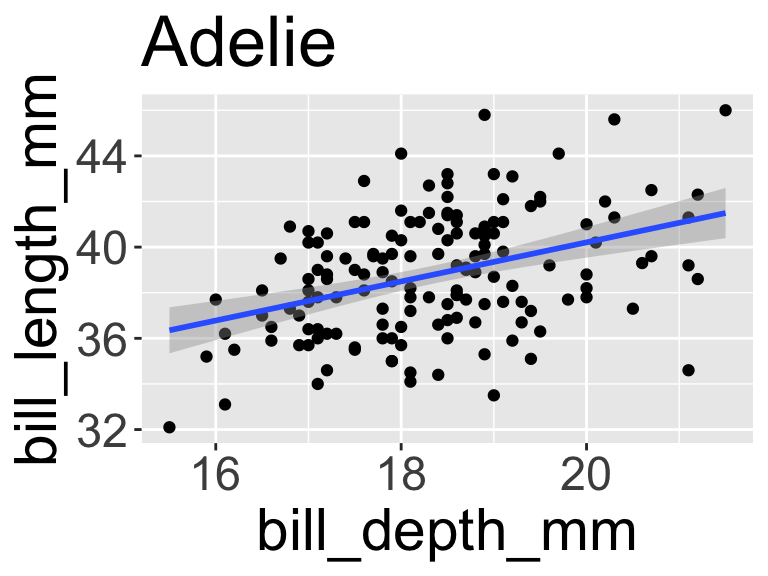
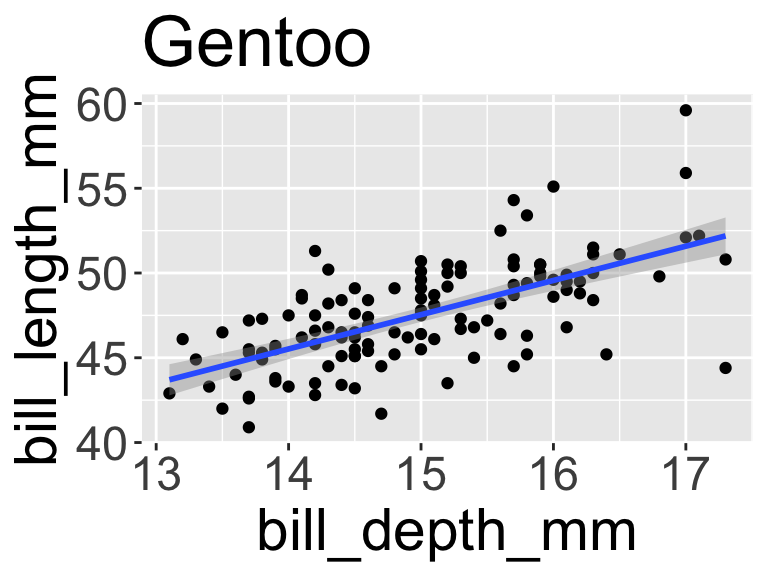
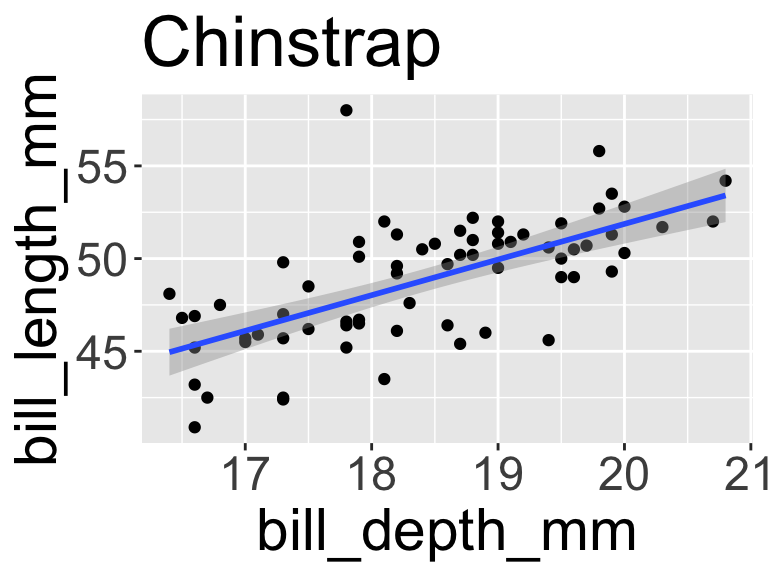
5.2 Example: build_scatterplot() function

  • Note that the build_scatterplot() function has two inputs: df and species
build_scatterplot <- function(df, species){
  ggplot(df) +
    aes(x = bill_depth_mm, y = bill_length_mm) +
    geom_point() +
    geom_smooth(method = "lm") +
    labs(title = species)
}
  • Now we call map2() inside mutate() similar to the way we used map() inside mutate() up above,
    • but we specify our two column names first as the first two arguments
penguins_nested <- penguins_nested %>%
  # create a new list column plot_out
  mutate(plot_out = map2(
    # first argument is going in the df = slot of build_scatterplot
    .x = data, 
    # second argument is going in the df = species slot of build_Scatterplot
    .y = species, 
    # name of function
    .f = build_scatterplot))

# or simply:
penguins_plotdata <- penguins_nested %>%
  mutate(plot_out = map2(data, species, build_scatterplot))

# we now have a list-column containing ggplots!
penguins_plotdata
# A tibble: 3 × 6
# Groups:   species [3]
  species   data               dim_data  model_out tidy_glm         plot_out  
  <fct>     <list>             <list>    <list>    <list>           <list>    
1 Adelie    <tibble [152 × 8]> <int [2]> <glm>     <tibble [2 × 5]> <ggplt2::>
2 Gentoo    <tibble [124 × 8]> <int [2]> <glm>     <tibble [2 × 5]> <ggplt2::>
3 Chinstrap <tibble [68 × 8]>  <int [2]> <glm>     <tibble [2 × 5]> <ggplt2::>
# We can show all our plots by calling the vector:
penguins_plotdata$plot_out
[[1]]


[[2]]


[[3]]

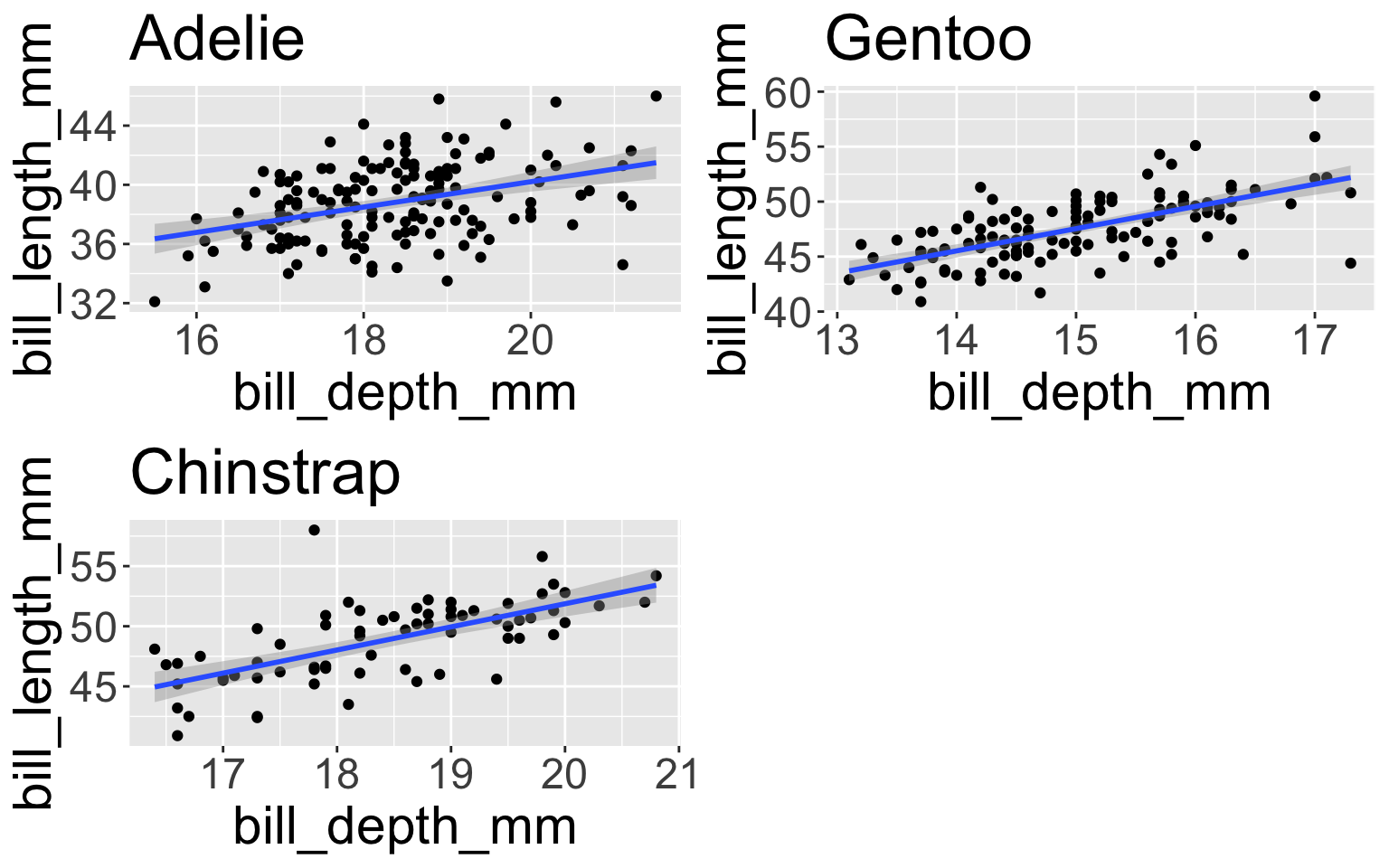
5.3 ggpubr::ggarrange()

There’s a function ggarrange() in the package ggpubr which will put multiple ggplots on the same figure for you:

ggpubr::ggarrange(plotlist = penguins_plotdata$plot_out)

6 Mapping lists of variables for regression modeling

  • Below we will use the reformulate() function to create a regression formula to use when running a regression model.
  • This will be very handy for running many regression models at once.

6.1 reformulate for regression formula

  • Recall that when running a regression model using lm(), the first parameter being specified is a formula.
  • In the example below using the penguins data, we specify formula = flipper_length_mm ~ bill_depth_mm + species:
lm(formula = flipper_length_mm ~ bill_depth_mm + species, 
   data = penguins) %>% tidy()
# A tibble: 4 × 5
  term             estimate std.error statistic   p.value
  <chr>               <dbl>     <dbl>     <dbl>     <dbl>
1 (Intercept)        137.       5.18      26.4  3.37e- 84
2 bill_depth_mm        2.89     0.281     10.3  1.05e- 21
3 speciesChinstrap     5.66     0.848      6.67 1.07e- 10
4 speciesGentoo       37.0      1.18      31.3  6.87e-102
  • Instead of specifying the formula within lm(), we can first create the formula as an R object, and then refer to the R object within lm().
  • Below we create the formula using the reformulate() function. The termlabels are the independent variables and response the dependent variable of the model:
penguin_formula <- reformulate(termlabels = c("bill_depth_mm", "species"),
                               response = "flipper_length_mm")
penguin_formula
flipper_length_mm ~ bill_depth_mm + species
lm(formula = penguin_formula, data = penguins) %>% 
  tidy()
# A tibble: 4 × 5
  term             estimate std.error statistic   p.value
  <chr>               <dbl>     <dbl>     <dbl>     <dbl>
1 (Intercept)        137.       5.18      26.4  3.37e- 84
2 bill_depth_mm        2.89     0.281     10.3  1.05e- 21
3 speciesChinstrap     5.66     0.848      6.67 1.07e- 10
4 speciesGentoo       37.0      1.18      31.3  6.87e-102
  • The advantage of creating a formula this way, is that we can then specify the termlabels and response as R objects as well:
covariates <- c("bill_depth_mm", "species")
outcome <- "flipper_length_mm"

penguin_formula <- reformulate(termlabels = covariates, 
                       response = outcome)
penguin_formula
flipper_length_mm ~ bill_depth_mm + species
lm(formula = penguin_formula, data = penguins) %>% tidy()
# A tibble: 4 × 5
  term             estimate std.error statistic   p.value
  <chr>               <dbl>     <dbl>     <dbl>     <dbl>
1 (Intercept)        137.       5.18      26.4  3.37e- 84
2 bill_depth_mm        2.89     0.281     10.3  1.05e- 21
3 speciesChinstrap     5.66     0.848      6.67 1.07e- 10
4 speciesGentoo       37.0      1.18      31.3  6.87e-102

6.2 Create function for regression model using reformulate()

  • Using reformulate() to run a regression model lets us more easily specify the variables that go into a model when using function.
  • Below is the function run_regression that can be used to run a linear model:
# Function to run linear regression with specified covariates
run_regression <- function(covariates, outcome, dataset) {
  formula <- reformulate(termlabels = covariates, 
                         response = outcome)
  lm(formula, data = dataset)
}
  • An example using the function run_regression with the penguins data:
penguins_covariates <- c("bill_depth_mm", "species")

lm_pengiuns <- run_regression(covariates = penguins_covariates,
               outcome = "flipper_length_mm",
               dataset = penguins)

tidy(lm_pengiuns)
# A tibble: 4 × 5
  term             estimate std.error statistic   p.value
  <chr>               <dbl>     <dbl>     <dbl>     <dbl>
1 (Intercept)        137.       5.18      26.4  3.37e- 84
2 bill_depth_mm        2.89     0.281     10.3  1.05e- 21
3 speciesChinstrap     5.66     0.848      6.67 1.07e- 10
4 speciesGentoo       37.0      1.18      31.3  6.87e-102

6.3 Example from cannabis use study

  • Data are from the baseline time point of an ongoing longitudinal study investigating relationships between pain, mental health, cannabis use, and prescribed opioid doses.
  • Participants are Veterans from across the country that are on long-term opioid therapy and have recently tested positive for cannabis use via periodic urine drug testing.
  • Most of the variables in the dataset are from the baseline survey participants completed.
    • Variables are described in the questions below where they are being use.
  • The data for this example are a random sample of the actual dataset and only include a small subset of all the variables data were collected on. Some variables have had their values slightly altered to further de-identify the data.
load(here::here("part10", "data", "ddd.Rdata"))

glimpse(ddd)
Rows: 250
Columns: 21
$ pptid                 <chr> "258", "484", "237", "023", "033", "510", "545",…
$ gender                <dbl> 1, 1, 1, 1, 2, 1, 1, 1, 1, 1, 1, 4, 1, 2, 1, 1, …
$ Age                   <dbl> 59.14031, 39.14031, 68.14031, 77.14031, 61.14031…
$ Education             <chr> "Some college or more", "Some college or more", …
$ biospec_pt            <dbl> 1, 1, 1, 1, 1, 1, 0, 1, 1, 0, 1, 1, 1, 1, 1, 1, …
$ Cannabis_Result       <dbl> 1, 1, 1, 1, 1, 1, -98, 1, 1, -98, 1, 1, 1, -98, …
$ Carboxy_TH            <dbl> 1.43, 52.82, 7.43, 8.33, 79.18, 71.98, -98.00, 5…
$ bpi_intensityscore    <dbl> 4.798163, 4.048163, 5.548163, 6.548163, 5.798163…
$ bpi_interferencescore <dbl> 2.738616, 0.738616, 6.452902, 5.595759, 6.024330…
$ count_2more_methods   <dbl> 1, NA, 4, NA, 7, NA, NA, NA, 4, NA, NA, NA, NA, …
$ used_2more_methods    <chr> "Yes", "No", "Yes", "No", "Yes", "No", "No", "No…
$ freq_Smoke_days       <chr> "NA_days", "4_days", "3_days", "5_days", "7_days…
$ freq_Smoke            <dbl> NA, 4, 3, 5, 7, NA, 7, 7, 3, NA, NA, NA, 4, NA, …
$ freq_Smoke_test       <dbl> NA, 4, 3, 5, 7, NA, 7, 7, 3, NA, NA, NA, 4, NA, …
$ freq_Eat              <dbl> 1, NA, NA, NA, NA, 7, NA, NA, NA, NA, 4, NA, NA,…
$ freq_Drink            <dbl> NA, NA, NA, NA, NA, NA, NA, NA, NA, NA, NA, NA, …
$ freq_Vape             <dbl> 1, NA, NA, NA, 1, NA, NA, NA, 4, NA, NA, NA, NA,…
$ freq_Dab              <dbl> NA, NA, NA, NA, 7, NA, NA, NA, NA, NA, NA, NA, N…
$ freq_Skin             <dbl> NA, NA, 4, NA, NA, NA, NA, NA, NA, NA, NA, NA, N…
$ freq_Patch            <dbl> NA, NA, NA, NA, NA, NA, NA, NA, NA, NA, NA, NA, …
$ freq_Other            <dbl> NA, NA, NA, NA, NA, NA, NA, NA, NA, NA, NA, NA, …

Descriptions of some of the variables:

  • Pain
    • The Brief Pain Inventory (BPI) was used to measure pain via the survey.
    • Pain intensity:
      • The variable bpi_intensityscore in the dataset is the mean of 4 questions on the BPI (not included in the dataset) asking about pain,
      • each of which ranged from 0 (No pain) to 10 (Pain as bad as you can imagine).
    • Pain interference:
      • The variable bpi_interferencescore in the dataset is the mean of 7 questions on the BPI (not included in the dataset) about daily acitivty,
      • each of which ranged from 0 (Does not interfere) to 10 (Completely interferes).
  • Routes of cannabis administration
    • Participants were asked the following question:
      • During the past 30 days, what were all of the ways you used cannabis/marijuana? Please check all the boxes that apply.
    • Choices
      • Smoke (ex. joint, bong, pipe, blunt, spliff)
      • Eat (ex. In brownies, cakes, cookies, candy)
      • Drink (ex. In tea, soda, alcohol, or tincture)
      • Vape (ex. In an e-cigarette-like vaporizer, vape pen, or another vaporizing device)
      • Dab (ex. Using waxes or concentrates in a dab rig or other dabbing device)
      • Applied to skin (ex. Lotion, ointment, or salve)
      • Transdermal (patch)
      • Used it in some other way ( ex. pills or tabs)
    • The variable used_2more_methods is
      • Yes if 2 or more routes of administration were selected
      • No if 1 route of administration was selected

Model bpi_intensityscore vs freq_Smoke

  • One of the survey questions was “On average, how many days per week do you typically smoke cannabis/marijuana?”
    • Values are 1-7, where 1 denotes at most 1 day a week, on average.
    • Responses are recorded in the variable freq_Smoke.
  • Use the function run_regression defined above to run a linear regression model using the dataset ddd with bpi_intensityscore as the outcome variable and freq_Smoke as the independent variable of the model.
  • tidy the output so that it includes the confidence intervals.
lm__pain_Smoke <- run_regression(covariates = "freq_Smoke",
               outcome = "bpi_intensityscore",
               dataset = ddd)

tidy(lm__pain_Smoke, conf.int = TRUE) %>% gt()
term estimate std.error statistic p.value conf.low conf.high
(Intercept) 5.64125860 0.28879948 19.533479 4.888206e-46 5.0713252 6.2111920
freq_Smoke -0.03448461 0.05020135 -0.686926 4.930284e-01 -0.1335548 0.0645856

Create a function to clean regression output

  • Create a new function with the parameters covariates, outcome, and dataset,
    • that runs a regression model using the run_regression function from above, and
    • reformats the tidy output so that it creates a regression table
lm_table <- function(covariates, outcome, dataset) {
  run_regression(covariates, outcome, dataset) %>% 
    tidy(conf.int = TRUE) %>% 
    select(term, estimate, conf.low, conf.high, p.value) %>% 
    mutate(
      p.value = scales::pvalue(p.value),
      across(.col = dplyr::where(is.numeric), 
             .fns = ~ scales::number(x = ., accuracy = 0.1))) 
}

Test the function:

lm_table(covariates = "freq_Smoke",
         outcome = "bpi_intensityscore",
         dataset = ddd) 
# A tibble: 2 × 5
  term        estimate conf.low conf.high p.value
  <chr>       <chr>    <chr>    <chr>     <chr>  
1 (Intercept) 5.6      5.1      6.2       <0.001 
2 freq_Smoke  0.0      -0.1     0.1       0.493  
  • In addition to the variable freq_Smoke, the dataset has variables freq_Eat, freq_Drink, freq_Vape, freq_Dab, freq_Skin, and freq_Other for the frequency of cannabis use for the other routes of administration included in the survey.
    • Similarly to freq_Smoke, each of these are how many days per week on average respondents use the respective routes of administration.
    • Values are 1-7, where 1 denotes at most 1 day a week, on average.
  • We want to run separate regression models for each of the routes of cannabis administration.
    • all have bpi_intensityscore as the outcome variable and
    • each model uses one of the 8 routes of administration as the independent variable of the model.
  • We will do this by using purrr:map() and having it iterate the function lm_table over the covariates_list created below:
covariates_list <- list(Smoke = "freq_Smoke",
                        Eat = "freq_Eat",
                        Drink = "freq_Drink",
                        Vape = "freq_Vape",
                        Dab = "freq_Dab",
                        Skin = "freq_Skin",
                        Other = "freq_Other")
route_models_tidy <- map(
  .x = covariates_list,
  ~ lm_table(covariates = .x,
                  outcome = "bpi_intensityscore", 
                  dataset =ddd))

route_models_tidy
$Smoke
# A tibble: 2 × 5
  term        estimate conf.low conf.high p.value
  <chr>       <chr>    <chr>    <chr>     <chr>  
1 (Intercept) 5.6      5.1      6.2       <0.001 
2 freq_Smoke  0.0      -0.1     0.1       0.493  

$Eat
# A tibble: 2 × 5
  term        estimate conf.low conf.high p.value
  <chr>       <chr>    <chr>    <chr>     <chr>  
1 (Intercept) 5.1      4.6      5.6       <0.001 
2 freq_Eat    0.1      0.0      0.2       0.065  

$Drink
# A tibble: 2 × 5
  term        estimate conf.low conf.high p.value
  <chr>       <chr>    <chr>    <chr>     <chr>  
1 (Intercept) 5.9      4.9      6.8       <0.001 
2 freq_Drink  -0.1     -0.3     0.1       0.297  

$Vape
# A tibble: 2 × 5
  term        estimate conf.low conf.high p.value
  <chr>       <chr>    <chr>    <chr>     <chr>  
1 (Intercept) 5.7      5.1      6.4       <0.001 
2 freq_Vape   0.0      -0.1     0.1       0.714  

$Dab
# A tibble: 2 × 5
  term        estimate conf.low conf.high p.value
  <chr>       <chr>    <chr>    <chr>     <chr>  
1 (Intercept) 5.5      3.4      7.6       <0.001 
2 freq_Dab    0.0      -0.4     0.4       >0.999 

$Skin
# A tibble: 2 × 5
  term        estimate conf.low conf.high p.value
  <chr>       <chr>    <chr>    <chr>     <chr>  
1 (Intercept) 4.4      3.4      5.4       <0.001 
2 freq_Skin   0.2      0.0      0.5       0.040  

$Other
# A tibble: 2 × 5
  term        estimate conf.low conf.high p.value
  <chr>       <chr>    <chr>    <chr>     <chr>  
1 (Intercept) 4.2      1.9      6.6       0.005  
2 freq_Other  0.3      -0.3     0.8       0.277  

In part 8 we learned how to convert map’s list output to a tibble with list_rbind():

route_models_tidy %>% 
  list_rbind(names_to = "data_source")
# A tibble: 14 × 6
   data_source term        estimate conf.low conf.high p.value
   <chr>       <chr>       <chr>    <chr>    <chr>     <chr>  
 1 Smoke       (Intercept) 5.6      5.1      6.2       <0.001 
 2 Smoke       freq_Smoke  0.0      -0.1     0.1       0.493  
 3 Eat         (Intercept) 5.1      4.6      5.6       <0.001 
 4 Eat         freq_Eat    0.1      0.0      0.2       0.065  
 5 Drink       (Intercept) 5.9      4.9      6.8       <0.001 
 6 Drink       freq_Drink  -0.1     -0.3     0.1       0.297  
 7 Vape        (Intercept) 5.7      5.1      6.4       <0.001 
 8 Vape        freq_Vape   0.0      -0.1     0.1       0.714  
 9 Dab         (Intercept) 5.5      3.4      7.6       <0.001 
10 Dab         freq_Dab    0.0      -0.4     0.4       >0.999 
11 Skin        (Intercept) 4.4      3.4      5.4       <0.001 
12 Skin        freq_Skin   0.2      0.0      0.5       0.040  
13 Other       (Intercept) 4.2      1.9      6.6       0.005  
14 Other       freq_Other  0.3      -0.3     0.8       0.277  

Can further improve this:

route_models_tidy %>% 
  list_rbind(names_to = "data_source") %>% 
  filter(term != "(Intercept)") %>% 
  unite(col = CI, conf.low:conf.high, sep = ", ") %>% 
  gt()
data_source term estimate CI p.value
Smoke freq_Smoke 0.0 -0.1, 0.1 0.493
Eat freq_Eat 0.1 0.0, 0.2 0.065
Drink freq_Drink -0.1 -0.3, 0.1 0.297
Vape freq_Vape 0.0 -0.1, 0.1 0.714
Dab freq_Dab 0.0 -0.4, 0.4 >0.999
Skin freq_Skin 0.2 0.0, 0.5 0.040
Other freq_Other 0.3 -0.3, 0.8 0.277

gtsummary tables of model output

route_models <- map(
  .x = covariates_list,
  ~ run_regression(covariates = .x,
                  outcome = "bpi_intensityscore", 
                  dataset =ddd))

route_models
$Smoke

Call:
lm(formula = formula, data = dataset)

Coefficients:
(Intercept)   freq_Smoke  
    5.64126     -0.03448  


$Eat

Call:
lm(formula = formula, data = dataset)

Coefficients:
(Intercept)     freq_Eat  
     5.0637       0.1072  


$Drink

Call:
lm(formula = formula, data = dataset)

Coefficients:
(Intercept)   freq_Drink  
    5.88517     -0.09928  


$Vape

Call:
lm(formula = formula, data = dataset)

Coefficients:
(Intercept)    freq_Vape  
    5.74066     -0.02307  


$Dab

Call:
lm(formula = formula, data = dataset)

Coefficients:
(Intercept)     freq_Dab  
  5.5100357    0.0001173  


$Skin

Call:
lm(formula = formula, data = dataset)

Coefficients:
(Intercept)    freq_Skin  
     4.3986       0.2432  


$Other

Call:
lm(formula = formula, data = dataset)

Coefficients:
(Intercept)   freq_Other  
     4.2456       0.2636  
# Create gtsummary regression tables for each of the models:
tbl_reg_route_models <- map(
  route_models, 
  ~tbl_regression(.x))

tbl_merge(tbl_reg_route_models)
Characteristic
Table 1
Table 2
Table 3
Table 4
Table 5
Table 6
Table 7
Beta 95% CI1 p-value Beta 95% CI1 p-value Beta 95% CI1 p-value Beta 95% CI1 p-value Beta 95% CI1 p-value Beta 95% CI1 p-value Beta 95% CI1 p-value
freq_Smoke -0.03 -0.13, 0.06 0.5


freq_Eat


0.11 -0.01, 0.22 0.065


freq_Drink


-0.10 -0.29, 0.09 0.3


freq_Vape


-0.02 -0.15, 0.10 0.7


freq_Dab


0.00 -0.36, 0.36 >0.9


freq_Skin


0.24 0.01, 0.48 0.040


freq_Other


0.26 -0.28, 0.80 0.3
1 CI = Confidence Interval

6.4 Challenge 2

  1. For the cannabis study (dataset ddd), run three linear regression models using map() where
    • all have pain interference as the outcome
    • the independent variables are different for each:
      • gender, Age, Carboxy_TH
      • gender, Age, Carboxy_TH, used_2more_methods
      • gender, Age, Carboxy_TH, used_2more_methods, freq_Smoke
  2. Create a merged table of the three regression models using the gtsummary package.

7 Where Next?

Using and understanding purrr functions opens up something really powerful: parallel computing. You can have multiple cores of a machine running iterations of your list using the furrr (short for future purrr) package.

Learning more about functions and vectorization will help you to reduce the number of mistakes in analysis.

8 Debugging functions

8.1 Debugging tip

Here’s a tip regarding function “debugging.” Let’s say you have a function

myfun <- function(df_input) {
   if(nrow(df_input) < 10) {stop("Need more columns")}
   df_input %>% summarize(mean_b = mean(species))
}

and you’re trying to figure out why you’re getting an error or not getting the right result. In the console or in your qmd type

df_input <- penguins
  • Then run the lines of code in your function one by one, in order, from the top, and see what causes the break.
  • Since you’ve “defined” the object as df_input as something, now you can test/debug the lines of code inside the function that use df_input.
  • It’s pretty difficult to just keep editing your function when you’re trying to figure out what works/does not work!

This would be my thought process:

myfun <- function(df_input) {
  if(nrow(df_input) < 10) {stop("Need more rows")}
  df_input %>% summarize(mean_b = mean(species))
}

# doesn't work, not an error but I get a warning and a weird result of NA
myfun(penguins)
# A tibble: 1 × 1
  mean_b
   <dbl>
1     NA
df_input <- penguins

# now I can run through my function code:

if(nrow(df_input) < 10) {stop("Need more rows")}
# that's fine, didn't report an error/stop

df_input %>% summarize(mean_b = mean(species))
# A tibble: 1 × 1
  mean_b
   <dbl>
1     NA
# Warning; Caused by warning in `mean.default()`:
# ! argument is not numeric or logical: returning NA 

# This isn't an error but I am getting a warning that
# my argument is not numeric or logical. Oops! I can't
# take mean of species, species is a character! I should fix

df_input %>% summarize(mean_b = mean(body_mass_g))
# A tibble: 1 × 1
  mean_b
   <dbl>
1     NA
# still getting NA, need to fix again
df_input %>% summarize(mean_b = mean(body_mass_g, na.rm = TRUE))
# A tibble: 1 × 1
  mean_b
   <dbl>
1  4202.
# ok now I fixed my function, it should work

myfun <- function(df_input) {
  if(nrow(df_input) < 10) {stop("Need more columns")}
  df_input %>% summarize(mean_b = mean(body_mass_g, na.rm = TRUE))
}

# doesn't work, not an error but I get a warning and a weird result of NA
myfun(penguins)
# A tibble: 1 × 1
  mean_b
   <dbl>
1  4202.

9 Post Class Survey

Please fill out the post-class survey.

Your responses are anonymous in that I separate your names from the survey answers before compiling/reading.

You may want to review previous years’ feedback here.

10 Acknowledgements

  • Meike Niederhausen adapted from notes written by Jessica Minnier, which were adapted from Ted Laderas’ lessons on purrr.
  • New material added by Meike Niederhausen on iterating regression models for different variables.